\
**Category:** Elements API\
**Created:** [July 16, 2025, 6:07pm UTC](https://forums.realmacsoftware.com/t/custom-element-html-help-please/48912 "2025-07-16T18:07:18Z")\
**Posts on this page:** 13\
**Page:** 1
**Author:**  [@Ulrich](https://forums.realmacsoftware.com/u/Ulrich)\
**Post date:** [July 16, 2025, 6:07pm UTC](https://forums.realmacsoftware.com/t/custom-element-html-help-please/48912/1 "2025-07-16T18:07:18Z")
I’m beginning to understand what Custom Element HTML offers and am gaining my first experience.
Unfortunately, the explanations and help texts aren’t very comprehensive.
- What else can rw offer me? (rw.pages, rw.node)
- What elements does rw.node have? How can I display unknown elements?
- Are there examples of properties?
- Can I configure the settings via collections? Are there any examples?
I would really appreciate it if someone could help me. A code snippet would be enough.
---
**Author:**  [@Ulrich](https://forums.realmacsoftware.com/u/Ulrich)\
**Post date:** [July 16, 2025, 6:35pm UTC](https://forums.realmacsoftware.com/t/custom-element-html-help-please/48912/2 "2025-07-16T18:35:11Z")
Ups, i didn’t see all of your videos…
maybe all of my questens will be answered?
…still watching…
---
**Author:**  [@dan](https://forums.realmacsoftware.com/u/dan)\
**Post date:** [July 16, 2025, 6:57pm UTC](https://forums.realmacsoftware.com/t/custom-element-html-help-please/48912/3 "2025-07-16T18:57:39Z")
Hey @Ulrich
Have a look through the custom components [getting started guide here](https://docs.realmacsoftware.com/elements-docs/elements-app/components/custom-components).
There’s some example custom components in the drop down list, these are good to add and poke around in:
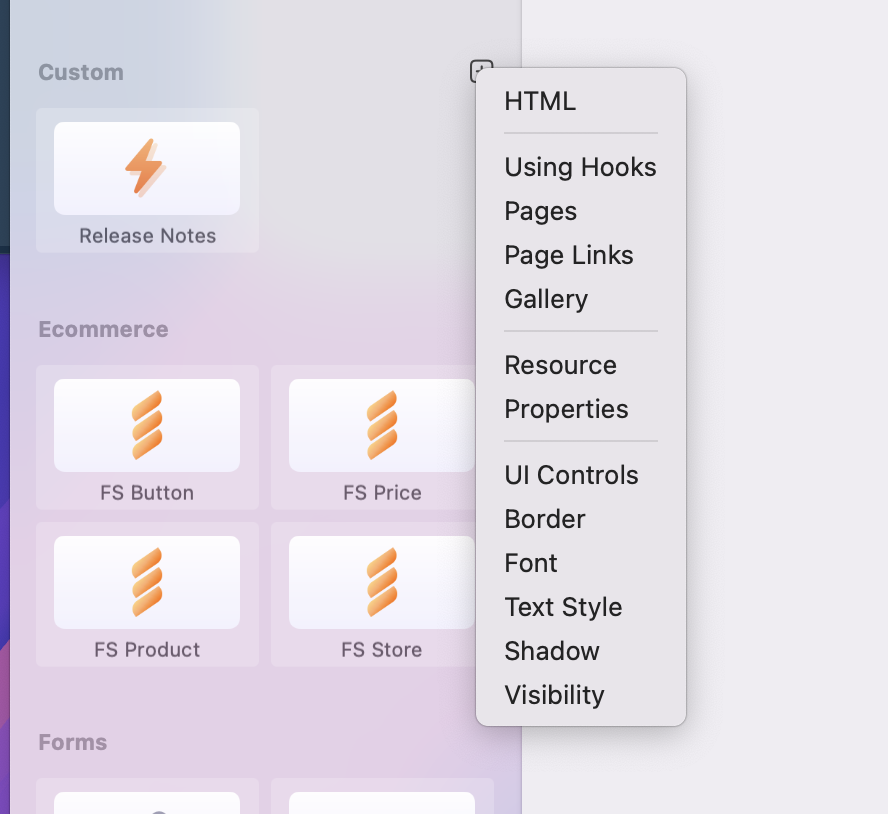
We also have a [Component Dev Category](https://forums.realmacsoftware.com/c/rapidweaver-elements/custom-components/56), that’s worth a browse through
And once you’ve got the hang of custom components you can look at migrating them to full on dev packs…
> **[Component Development](https://forums.realmacsoftware.com/c/rapidweaver-elements/custom-components/56)**
>
> The Elements language is a simple, yet powerful templating language for RapidWeaver Elements, it’s often referred to as the Elements API.
Have a browse and a watch of the videos then follow up with any questions you have, we’re always around to help 🙂
---
**Author:**  [@upssjw](https://forums.realmacsoftware.com/u/upssjw)\
**Post date:** [July 16, 2025, 7:08pm UTC](https://forums.realmacsoftware.com/t/custom-element-html-help-please/48912/4 "2025-07-16T19:08:33Z")
@dan dont think I ever clicked on any of the items in the dropdown list I only clicked on HTML not sure why I didn’t click on them, just went straight for html
---
**Author:**  [@handshaper](https://forums.realmacsoftware.com/u/handshaper)\
**Post date:** [July 16, 2025, 8:54pm UTC](https://forums.realmacsoftware.com/t/custom-element-html-help-please/48912/5 "2025-07-16T20:54:56Z")
@dan Why didn’t I look at some of these other options sooner? I learnt an awful lot from them.
I need a little help with a custom component I started developing over the weekend with Mr. ElementsBot. It reached a point where I wanted to be able to add some content and the filename through the use of properties. But we could never get it to work. Today, I finally managed to figure out how to make it work.
However, one thing I’m stuck on is finding a way to hide the pop-up and privacy modal when I need to work on the rest of the page. It attempted to figure this out with the bot, but was unable to get it to work. Please review it and advise on how to achieve this in the Cookie Consent component.
Here is a link to the project.
```auto
elementsapp://downloadDocument/dtwAfTR7NQDt
```
Ideally, all this would require is a toggle similar to the one used to show and hide a modal when working in the editor.
Everything is working as planned. I need the ability to show and hide the pop-up when working in the editor.
Your help would be greatly appreciated.
BTW, I have already gathered the necessary information for the privacy policy file name, title, and content text for the consent popup, using properties.
---
**Author:**  [@upssjw](https://forums.realmacsoftware.com/u/upssjw)\
**Post date:** [July 16, 2025, 9:18pm UTC](https://forums.realmacsoftware.com/t/custom-element-html-help-please/48912/7 "2025-07-16T21:18:44Z")
@handshaper try this
[elementsapp://downloadDocument/oRWPjHgEI412](elementsapp://downloadDocument/oRWPjHgEI412)
the switch is under cookie consent in the tree to turn back on
added line 76 and 128
and added switch in properties
the added code in line 76 could be moved to line 1
---
**Author:**  [@handshaper](https://forums.realmacsoftware.com/u/handshaper)\
**Post date:** [July 16, 2025, 9:32pm UTC](https://forums.realmacsoftware.com/t/custom-element-html-help-please/48912/8 "2025-07-16T21:32:12Z")
@upssjw Thanks for that, it works, but not correctly.
This toggle should only be visible when editing, not when displayed in the browser. Therefore, it is always true in the browser, unless the user has already given their consent.
This is close, but some logic distinguishes between editing and running.
---
**Author:**  [@upssjw](https://forums.realmacsoftware.com/u/upssjw)\
**Post date:** [July 16, 2025, 9:37pm UTC](https://forums.realmacsoftware.com/t/custom-element-html-help-please/48912/9 "2025-07-16T21:37:41Z")
misunderstood what you needed
although still not clear what you mean
or did you mean what ever state the switch is in the popup should always shown in the browser
---
**Author:**  [@handshaper](https://forums.realmacsoftware.com/u/handshaper)\
**Post date:** [July 16, 2025, 9:45pm UTC](https://forums.realmacsoftware.com/t/custom-element-html-help-please/48912/10 "2025-07-16T21:45:03Z")
@upssjw This should work just like the toggle you see in a Modal component, where the role of the toggle is to show and hide the modal IN THE EDITOR, so that you can get it out of the way when you are trying to work in the editor.
It is not used to control anything at runtime.
I have some code from Mr. Bot, but I could never get it to work, which is why I was asking for help. Your code does the right thing, but it is not tied to the EDITOR.
---
**Author:**  [@upssjw](https://forums.realmacsoftware.com/u/upssjw)\
**Post date:** [July 16, 2025, 9:48pm UTC](https://forums.realmacsoftware.com/t/custom-element-html-help-please/48912/11 "2025-07-16T21:48:27Z")
try that, probably a lot easier way to do but I have limited knowledge outside of tailwind
[elementsapp://downloadDocument/Je8Pg2B5zWWB](elementsapp://downloadDocument/Je8Pg2B5zWWB)
needs long in the code as it flashes on load
---
**Author:**  [@upssjw](https://forums.realmacsoftware.com/u/upssjw)\
**Post date:** [July 16, 2025, 10:06pm UTC](https://forums.realmacsoftware.com/t/custom-element-html-help-please/48912/12 "2025-07-16T22:06:54Z")
stops flicker
[elementsapp://downloadDocument/zdanUFnofNcc](elementsapp://downloadDocument/zdanUFnofNcc)
bound to be a simple solution in the code, beyond my try
---
**Author:**  [@handshaper](https://forums.realmacsoftware.com/u/handshaper)\
**Post date:** [July 16, 2025, 11:08pm UTC](https://forums.realmacsoftware.com/t/custom-element-html-help-please/48912/13 "2025-07-16T23:08:55Z")
@upssjw I resolved the flicker by performing extensive code refactoring. Additionally, I found a few extra DIVs in the code that needed to be cleaned up.
I moved all the style information outside the `@if` statement, as it would always be needed, and the same applies to the policy loading code.
Several refactoring opportunities exist to improve the code. But the main thing is that it now works as expected.
Mahalo for all your help.
---
**Author:**  [@upssjw](https://forums.realmacsoftware.com/u/upssjw)\
**Post date:** [July 16, 2025, 11:34pm UTC](https://forums.realmacsoftware.com/t/custom-element-html-help-please/48912/14 "2025-07-16T23:34:25Z")
That’s great I am ok with tailwind but trying to Learn alpine and js hard work when first start, good job for ai with alpine js, I can only simple things at the moment alpine is easier than js