\
**Category:** Announcements\
**Created:** [October 24, 2025, 6:07pm UTC](https://forums.realmacsoftware.com/t/elements-1-4-1-23894/52004 "2025-10-24T18:07:50Z")\
**Posts on this page:** 16\
**Page:** 1
**Author:**  [@dan](https://forums.realmacsoftware.com/u/dan)\
**Post date:** [October 24, 2025, 6:07pm UTC](https://forums.realmacsoftware.com/t/elements-1-4-1-23894/52004/1 "2025-10-24T18:07:50Z")
Hello again,
Yes, we’re doing a release on a Friday night… what could possibly go wrong?
In this build we’ve added some CMS related additions. **Watch the video below to learn how to use the new Related Items CMS Component** and log manager.
We also have some [Docs on the log manager here](https://docs.realmacsoftware.com/elements-docs/cms/cms/log-manager).
## What’s New in Elements 1.4.1?
- New Related Items CMS Component
- New CMS Log Manager added
## Purchase a License
You can visit the [elementsapp.io website](https://www.elementsapp.io/purchase/?utm_source=realmacsoftware-forum) to purchase a license.
## Get the Update
Elements should prompt you while it’s running to let you know there’s an update. If it doesn’t, you can select the “Check for Updates…” menu option from the “Elements” app menu.
Alternatively, you can always [download the latest build of Elements here](http://realmacsoftware.com/download/elements/).
## Give Feedback
If you are running a licensed copy of Elements, please post all feedback in the [Feedback Forum](https://forums.realmacsoftware.com/c/rapidweaver-elements/beta-feedback/57). You can use the Elements \> Send Feedback… menu item to automatically pre-fill the build number into a new topic.
---
**Author:**  [@Pegasus](https://forums.realmacsoftware.com/u/Pegasus)\
**Post date:** [October 24, 2025, 6:08pm UTC](https://forums.realmacsoftware.com/t/elements-1-4-1-23894/52004/2 "2025-10-24T18:08:41Z")
ITS FRIDAY 🤔 🙈 🎉 🎊
---
**Author:**  [@dan](https://forums.realmacsoftware.com/u/dan)\
**Post date:** [October 24, 2025, 6:14pm UTC](https://forums.realmacsoftware.com/t/elements-1-4-1-23894/52004/3 "2025-10-24T18:14:08Z")
It’s Friday! 🍻
---
**Author:**  [@Pegasus](https://forums.realmacsoftware.com/u/Pegasus)\
**Post date:** [October 24, 2025, 6:26pm UTC](https://forums.realmacsoftware.com/t/elements-1-4-1-23894/52004/4 "2025-10-24T18:26:20Z")
nice little tool! … and now playing with the new related items CMS component
---
**Author:**  [@Pegasus](https://forums.realmacsoftware.com/u/Pegasus)\
**Post date:** [October 24, 2025, 7:29pm UTC](https://forums.realmacsoftware.com/t/elements-1-4-1-23894/52004/5 "2025-10-24T19:29:16Z")
That’s really unfortunate. It seems that the “related items” feature doesn’t work with the way I’ve set up my “blog.”
Am I correct in assuming that the related items only work if the overview page uses the **item template** within the collection item?
Since there’s still the **canonical tag** issue — and I still want the pages to be indexed — I’ve been creating them directly in the **page manager** instead.
However, when I do that and try to use the related items feature, it doesn’t seem to find any proper connections.
---
**Author:**  [@dan](https://forums.realmacsoftware.com/u/dan)\
**Post date:** [October 24, 2025, 8:49pm UTC](https://forums.realmacsoftware.com/t/elements-1-4-1-23894/52004/6 "2025-10-24T20:49:12Z")
> [@Pegasus](#):
>
> Am I correct in assuming that the related items only work if the overview page uses the **item template** within the collection item?
It’s a bit hard to understand what you’re trying to do, but… The related item component is ideally for use on a post page within the item component.
Hmm, if all your pages are hard coded in the page manger it’s not going to work.
---
**Author:**  [@Pegasus](https://forums.realmacsoftware.com/u/Pegasus)\
**Post date:** [October 24, 2025, 9:23pm UTC](https://forums.realmacsoftware.com/t/elements-1-4-1-23894/52004/7 "2025-10-24T21:23:29Z")
> [@dan](#):
>
> Hmm, if all your pages are hard coded in the page manger it’s not going to work.
Each individual blog page (URL) was created directly in **Elements** , but the content itself is pulled from the **CMS via the corresponding Markdown files**.
I’ve sent you and Ben an email with a link to the project file.
If you find some time after the weekend to take a look at it, I’d really appreciate it.
---
**Author:**  [@Pegasus](https://forums.realmacsoftware.com/u/Pegasus)\
**Post date:** [October 26, 2025, 10:48am UTC](https://forums.realmacsoftware.com/t/elements-1-4-1-23894/52004/8 "2025-10-26T10:48:23Z")
I got it! I watched Ben’s video again and realized that I hadn’t placed the related items component inside the corresponding CMS item that provides the data for processing.
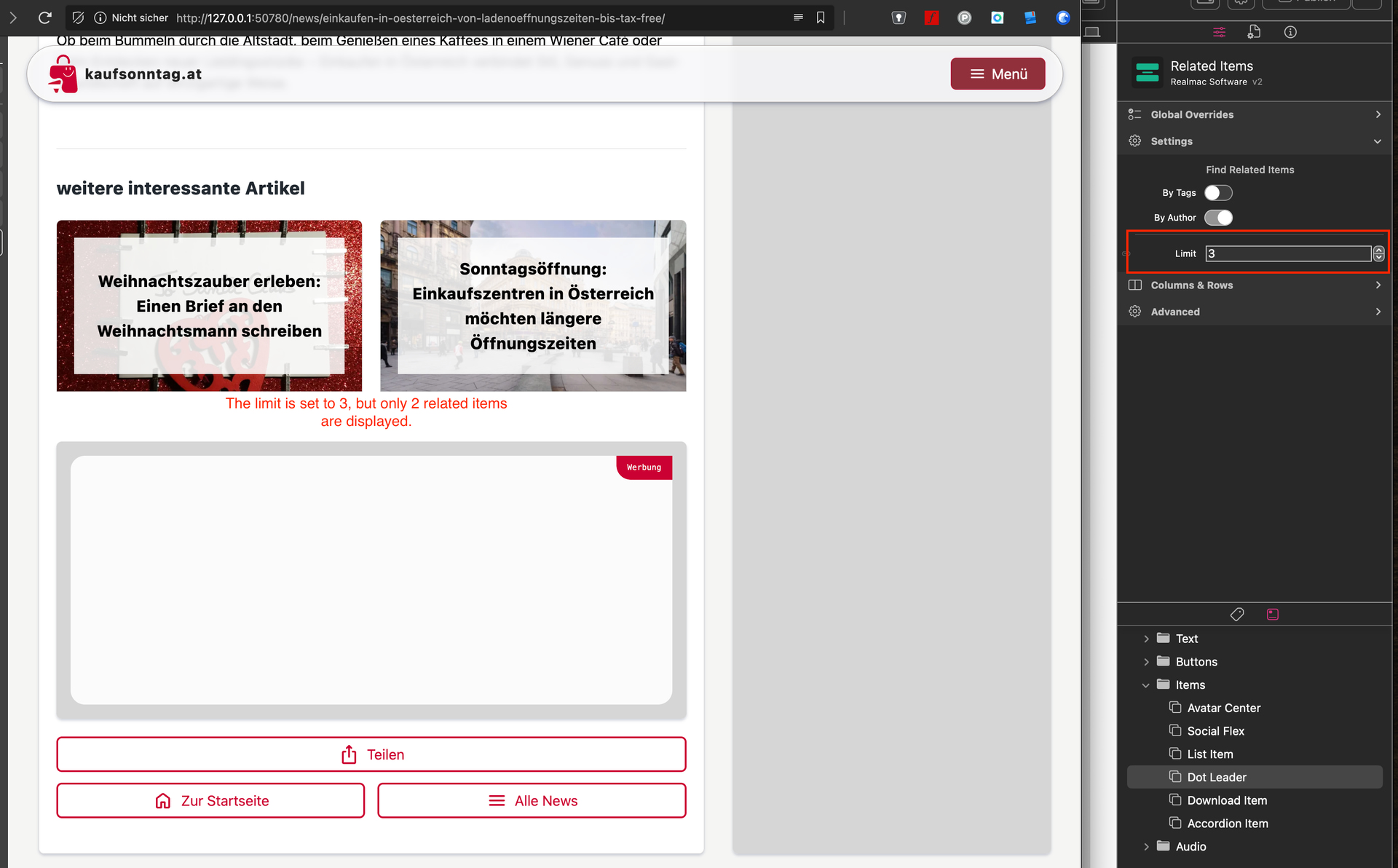
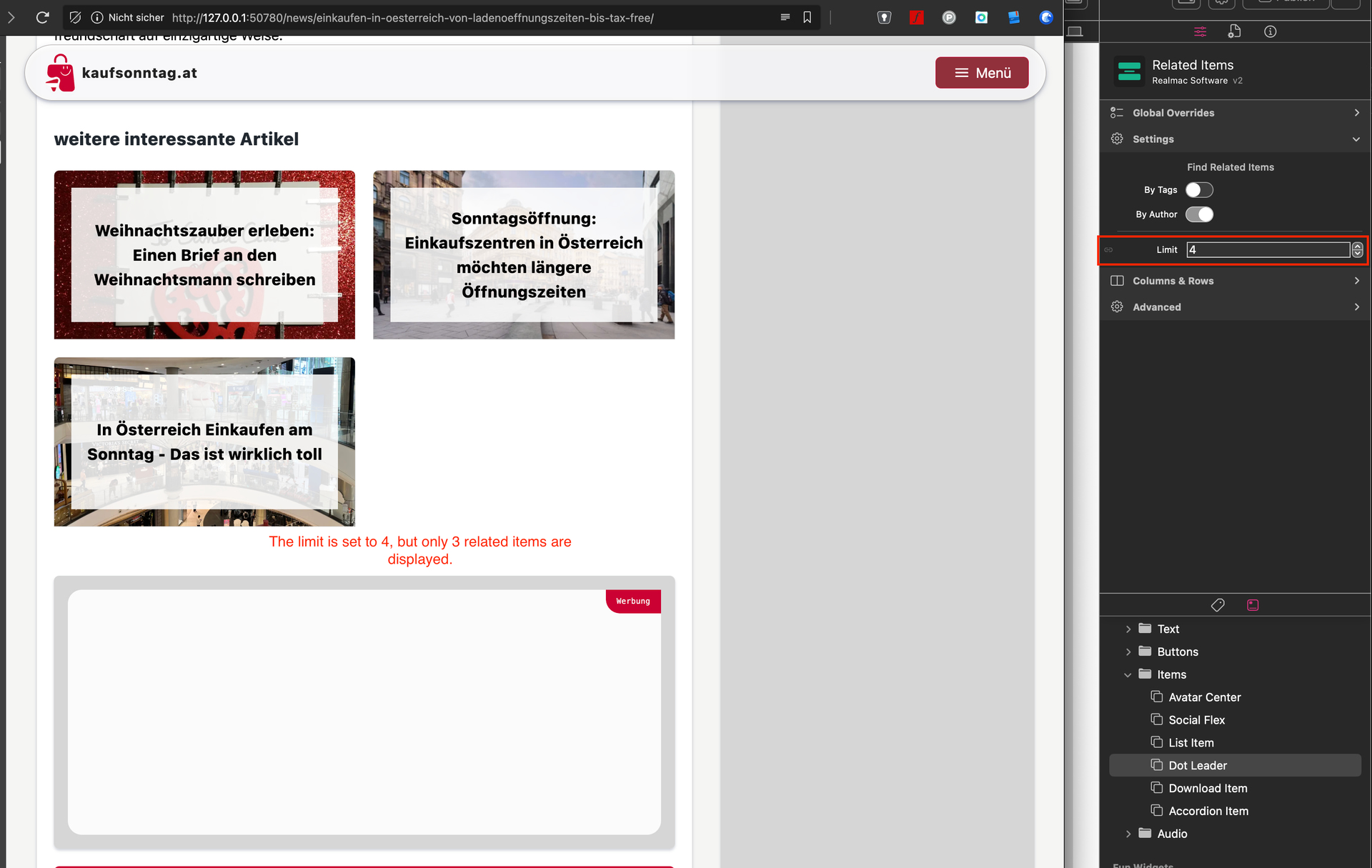
Now everything is working. BUT I noticed one thing: when I set the limit to 3 in the related items settings, only 2 are displayed. If I set the limit to 4, only 3 show up, and so on…
Not a big deal overall — just a small cosmetic issue.
---
**Author:**  [@dan](https://forums.realmacsoftware.com/u/dan)\
**Post date:** [October 26, 2025, 1:00pm UTC](https://forums.realmacsoftware.com/t/elements-1-4-1-23894/52004/9 "2025-10-26T13:00:25Z")
Glad you got it working 🙂
Sounds like that’s a minor “off by one” issue, I’ll get @ben to take a look and get it fixed up 👍
---
**Author:**  [@ben](https://forums.realmacsoftware.com/u/ben)\
**Post date:** [October 26, 2025, 3:25pm UTC](https://forums.realmacsoftware.com/t/elements-1-4-1-23894/52004/10 "2025-10-26T15:25:32Z")
I’ve managed to get this issue fixed, so it now returns 3 results when you ask for 3 results 😃
This fix will go out at some point next week. No changes needed in your project, it’ll just start working as expected 🙂
---
**Author:**  [@jbob](https://forums.realmacsoftware.com/u/jbob)\
**Post date:** [October 29, 2025, 6:41pm UTC](https://forums.realmacsoftware.com/t/elements-1-4-1-23894/52004/11 "2025-10-29T18:41:46Z")
I updated to 1.4.2 - now my blog displays the following error (when shown in Safari - I haven’t published it).
Am I doing something daft again ?
**Parse error** : syntax error, unexpected identifier “version” in **/Users/Jol/Library/Containers/com.realmacsoftware.rapidweaverelements/Data/tmp/RapidWeaver/925/RWDocumentPagePreview/document-D38F6C6A-0E0E-4AEA-9D02-2A5A733EE1C0/blog/index.php** on line **216**
Linky here - elementsapp://downloadDocument/1V4UG4TY3K5s
---
**Author:**  [@dan](https://forums.realmacsoftware.com/u/dan)\
**Post date:** [October 29, 2025, 7:41pm UTC](https://forums.realmacsoftware.com/t/elements-1-4-1-23894/52004/12 "2025-10-29T19:41:16Z")
Can you try quitting Elements, and restarting your Mac.
---
**Author:**  [@jbob](https://forums.realmacsoftware.com/u/jbob)\
**Post date:** [October 29, 2025, 9:50pm UTC](https://forums.realmacsoftware.com/t/elements-1-4-1-23894/52004/13 "2025-10-29T21:50:32Z")
Sorry Dan - restarted the Mac and the issue remains.
error line has however changed from 216 to 183 … if that means anything
file available as above if you get the time to take a look
Many thanks, Jol
**Parse error** : syntax error, unexpected identifier “version” in **/Users/Jol/Library/Containers/com.realmacsoftware.rapidweaverelements/Data/tmp/RapidWeaver/1243/RWDocumentPagePreview/document-2AC70D3E-BF73-4C15-8971-857CCAA5F49E/blog/blog/post/index.php** on line **183**
---
**Author:**  [@dan](https://forums.realmacsoftware.com/u/dan)\
**Post date:** [October 29, 2025, 10:33pm UTC](https://forums.realmacsoftware.com/t/elements-1-4-1-23894/52004/14 "2025-10-29T22:33:00Z")
This isn’t an Elements bug. The issue comes from an error introduced when you edited the Template HTML. The closing `` tag, which will completely break the page structure (I’m surprised it’s even loading!).
Click **Revert to Default** at the bottom of the window to restore the template, then re-add your custom scripts in the correct section of the file.

---
**Author:**  [@jbob](https://forums.realmacsoftware.com/u/jbob)\
**Post date:** [October 30, 2025, 10:31am UTC](https://forums.realmacsoftware.com/t/elements-1-4-1-23894/52004/15 "2025-10-30T10:31:58Z")
Oops - glad you’re here : )
---
**Author:**  [@jbob](https://forums.realmacsoftware.com/u/jbob)\
**Post date:** [October 31, 2025, 1:36pm UTC](https://forums.realmacsoftware.com/t/elements-1-4-1-23894/52004/16 "2025-10-31T13:36:39Z")
I have ‘related items’ working great … but what if I want to add an image ? - I can’t seem to get an image to show for each related item, even though the settings are as per the post image.