# Google Site Verification, Google Analytics, Shortcut Icon: where can I paste the code?

**URL:** https://forums.realmacsoftware.com/t/google-site-verification-google-analytics-shortcut-icon-where-can-i-paste-the-code/23816
**Category:** RapidWeaver Classic
**Created:** [December 1, 2018, 4:45pm UTC](https://forums.realmacsoftware.com/t/google-site-verification-google-analytics-shortcut-icon-where-can-i-paste-the-code/23816 "2018-12-01T16:45:08Z")
**Posts on this page:** 7
**Page:** 1

<div class="post-metadata">

### Author: ![GGrid](https://avatars.discourse-cdn.com/v4/letter/g/a9a28c/32.png) [@GGrid](https://forums.realmacsoftware.com/u/GGrid)
#### Post date: [December 1, 2018, 4:45pm UTC](https://forums.realmacsoftware.com/t/google-site-verification-google-analytics-shortcut-icon-where-can-i-paste-the-code/23816/1 "2018-12-01T16:45:08Z")

</div>

I would like to enter these codes in RW 7.5.6:

```
	<meta name="google-site-verification" content="DODgPVgEEZebQk-uF-OkhMwKazA1yfbJ703oND_lo2k" />

<!-- Global site tag (gtag.js) - Google Analytics -->
<script async src="https://www.googletagmanager.com/gtag/js?id=UA-101871749-4"></script>
<script>
  window.dataLayer = window.dataLayer || [];
  function gtag(){dataLayer.push(arguments);}
  gtag('js', new Date());

  gtag('config', 'UA-101871749-4');
</script>

<link rel="shortcut icon" type="image/x-icon" href="./favicon.ico">

```

* * *

```
Where can I paste the codes?
1) In Inspector?
2) In Settings -> Code?

What is the difference?
Thanks,

```

 ![rw%202018-12-01%2016-22-53](https://europe1.discourse-cdn.com/flex005/uploads/realmacsoftware1/original/2X/3/389fe68226312d71e0a3b2df92a277425c231295.png)

 ![rw%202018-12-01%2016-27-04](https://europe1.discourse-cdn.com/flex005/uploads/realmacsoftware1/original/2X/7/7d96fba050e34878e9733e8a3f970d437ba63529.png)

---

<div class="post-metadata">

### Author: ![teefers](https://dub1.discourse-cdn.com/flex005/user_avatar/forums.realmacsoftware.com/teefers/32/8173_2.png) [@teefers](https://forums.realmacsoftware.com/u/teefers)
#### Post date: [December 1, 2018, 5:16pm UTC](https://forums.realmacsoftware.com/t/google-site-verification-google-analytics-shortcut-icon-where-can-i-paste-the-code/23816/2 "2018-12-01T17:16:12Z")

</div>

Inspector is for that page only.

Site _settings_ will be for every page.

---

<div class="post-metadata">

### Author: ![GGrid](https://avatars.discourse-cdn.com/v4/letter/g/a9a28c/32.png) [@GGrid](https://forums.realmacsoftware.com/u/GGrid)
#### Post date: [December 1, 2018, 5:21pm UTC](https://forums.realmacsoftware.com/t/google-site-verification-google-analytics-shortcut-icon-where-can-i-paste-the-code/23816/3 "2018-12-01T17:21:12Z")

</div>

Thanks @teefers,  
but Site Settings alerts me regarding to the PATH of links (./, …/).  
In my site all the pages are in a separate directory.

---

<div class="post-metadata">

### Author: ![teefers](https://dub1.discourse-cdn.com/flex005/user_avatar/forums.realmacsoftware.com/teefers/32/8173_2.png) [@teefers](https://forums.realmacsoftware.com/u/teefers)
#### Post date: [December 1, 2018, 5:36pm UTC](https://forums.realmacsoftware.com/t/google-site-verification-google-analytics-shortcut-icon-where-can-i-paste-the-code/23816/4 "2018-12-01T17:36:33Z")

</div>

Why aren’t you just using the built-in Favicon (icon) in RapidWeaver?

Just Drag and drop and it does the work for you.

 ![2018-12-01_10-32-32](https://europe1.discourse-cdn.com/flex005/uploads/realmacsoftware1/original/2X/f/f94f71ae05ace01809fec9e5815885b2cf53ca61.jpeg)

---

<div class="post-metadata">

### Author: ![GGrid](https://avatars.discourse-cdn.com/v4/letter/g/a9a28c/32.png) [@GGrid](https://forums.realmacsoftware.com/u/GGrid)
#### Post date: [December 1, 2018, 8:35pm UTC](https://forums.realmacsoftware.com/t/google-site-verification-google-analytics-shortcut-icon-where-can-i-paste-the-code/23816/5 "2018-12-01T20:35:10Z")

</div>

If I use the the Built-It favicon system of RW, then I have favicon only for Homepage 🤔

I just solved the favicon issue:  
[http://forums.realmacsoftware.com/t/pinned-tab-icon-feature-in-rw-7-4/](http://forums.realmacsoftware.com/t/pinned-tab-icon-feature-in-rw-7-4/)

Favicon Generator ([https://realfavicongenerator.net/](https://realfavicongenerator.net/)) is very powerful and customisable; it creates all the icon suitable: favicon, pinned icon, iOS webclip, Android Chrome icon, Windows metro, classic desktop browsers icon, with a preview interface. It is very easy to use. It export files for the root dir of the domain and a code that must be pasted in HEAD section on the site. It also can check the icons of a site. It works perfectly.

---

<div class="post-metadata">

### Author: ![GGrid](https://avatars.discourse-cdn.com/v4/letter/g/a9a28c/32.png) [@GGrid](https://forums.realmacsoftware.com/u/GGrid)
#### Post date: [December 1, 2018, 8:42pm UTC](https://forums.realmacsoftware.com/t/google-site-verification-google-analytics-shortcut-icon-where-can-i-paste-the-code/23816/6 "2018-12-01T20:42:04Z")

</div>

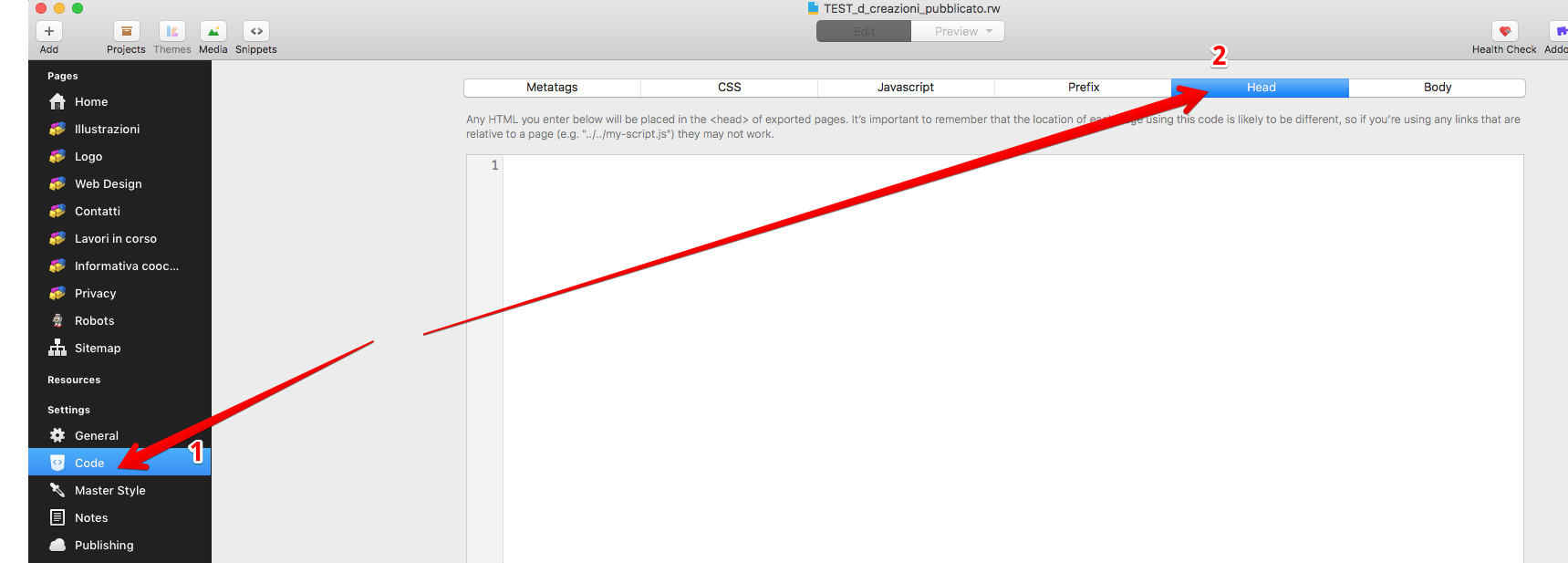
Now my question is: can I paste Google codes in **Settings → Code → Head (or Body…)**?

 ![screenshot_0739](https://europe1.discourse-cdn.com/flex005/uploads/realmacsoftware1/original/2X/4/40338378d27a05c1bbba9aecf56c32237b45ba06.png)

---

<div class="post-metadata">

### Author: ![system](https://dub1.discourse-cdn.com/flex005/user_avatar/forums.realmacsoftware.com/system/32/25301_2.png) [@system](https://forums.realmacsoftware.com/u/system)
#### Post date: [January 1, 2019, 6:42am UTC](https://forums.realmacsoftware.com/t/google-site-verification-google-analytics-shortcut-icon-where-can-i-paste-the-code/23816/7 "2019-01-01T06:42:05Z")

</div>

This topic was automatically closed 30 days after the last reply. New replies are no longer allowed.