I can’t seem to replicate what you just did.
My iMac shows a tab at the top of the monitor that says “DEVELOP”.
There are about 30 tabs below the Develop Tab.
Which one of these do you select prior to right-clicking the image?
I can’t seem to replicate what you just did.
My iMac shows a tab at the top of the monitor that says “DEVELOP”.
There are about 30 tabs below the Develop Tab.
Which one of these do you select prior to right-clicking the image?
None. Once developer tools are enabled (and it sounds like you have that done), then just right-click on one of your images and select “inspect element”.
When you mouse over elements in the lower pane, it will highlight and show dimensions overlaid on the main browser area.
Thanks Don! Just what I needed.
Tim,
From what I’m gleaning from your posts it seems to me that the Photos Stack from Nick Cates Design could solve a number of these issues. I just went to get the URL only to discover he’s working on Photos v2.
He’s made a video discussing what’s coming, and the Batch Mode sounds like a fix for you. https://youtu.be/tf6s-CYa8C8?t=233.
Photos 1 is here. https://nickcatesdesign.com/preview/rapidweaver/photo/index.html
Photos v2 is to be released sometime in January.
Thanks David,
Cate’s Photo 2 looks interesting. I am anxious to try it out.
Indrid, where did you find this analytic screen?
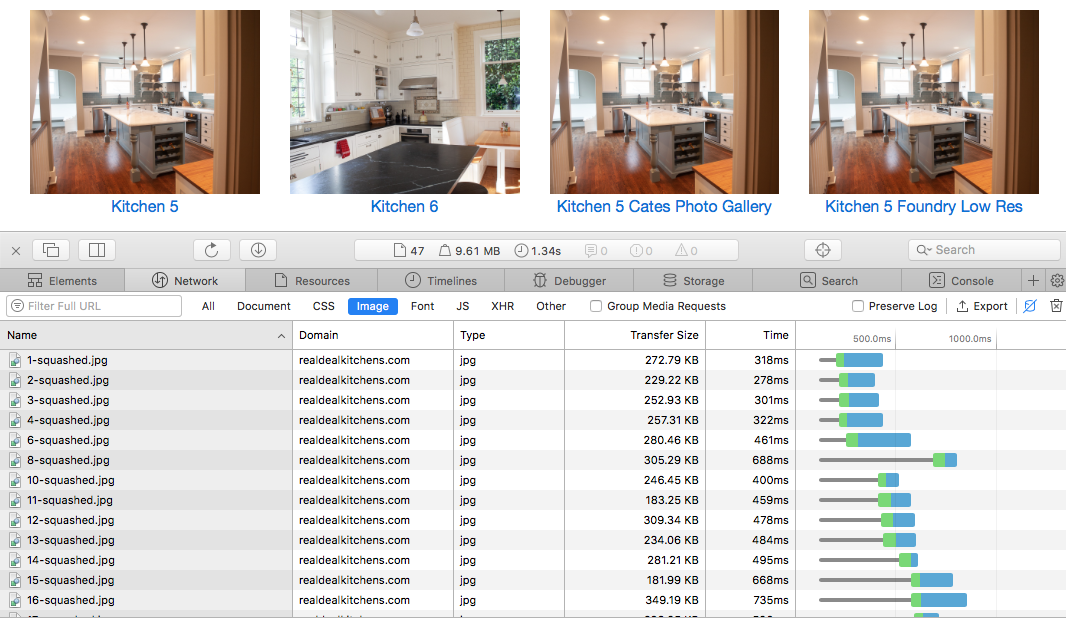
That looks like the Network tab in Chrome’s DevTools. It’s very similar to the Network pane in Safari. Once you switch to the Network pane, you may need to refresh the page, if it wasn’t recording the page load prior.
Here’s Safari’s similar pane:
So the top of this analytic screen shows total download time (1.34 sec) for entire page?
If I wanted to use this as a tool for improving download speed I would compare identical web page composition using different levels of compression for each image?
Did you notice the part in his video about social media sharing buttons?
I don’t know if this is unique or not but it sure does sound useful.
Indeed, that’s all it is. Well worth the time learning how to use Chrome dev tools.
Yes, it took the page 1.34s to load over my connection. Notice the time for @indridcold was 9.65s.
The time a page loads will depend on a user’s internet connection. I would pay more attention to the amount of bytes it takes to load the page. In my screenshot, thats the 9.61 MB number.
This topic was automatically closed 30 days after the last reply. New replies are no longer allowed.