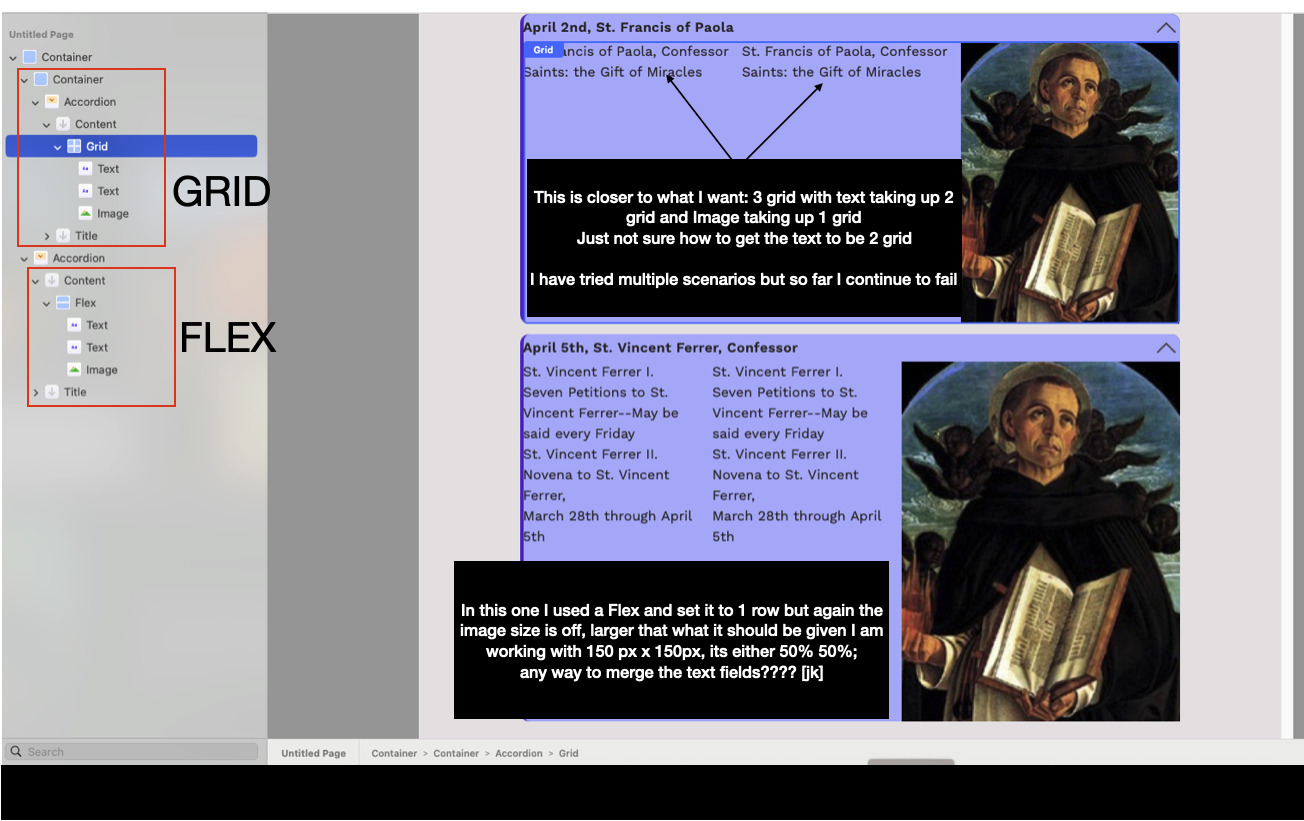
I am driving myself batty trying different scenarios to see if I can make this happen.
I am new to elements but long time user of RapidWeaver Classic. Recently my accordion broke and no longer function. I am ok with that, tech and upgrades on the website is what has done it. I decided to given elements a try as this is where things are heading. Downloaded a trial, like what I am seeing and having fun remaking some pages.
In my previous accordion, I was able to have a fixed image size with no scaling for desktop, I get on other platforms like phones it needed to be friendly. I have placed the accordion into a container. I just need the text to be 2/3 of the container and the image to be 1/3. Figured simple column would do the trick. I made the text larger with margins. On the image I want to specify the size and this is where it all goes crazy. No matter what I do, the images are all different size due the text side of things. I happened to notice if there where too much open spaces the image was large, if not enough, the image was small. So I set the container to a specific size, thinking – the smart me would work it differently…. yeah it not work.
So then I was watching a video and say how you could nestle container –> grid –>text –> image –>container grid which you could specify to take up 2 columns out of 3. I like this approach. So I have been attempted this, wanting my text to be 2 columns and the the image 1 column and it seems that according will not all the maneuvering on the content as such. Such a brilliant concept and yes more advance than my capabilities at this time but hey I am learning here. My husband told me to resize all the images to fit the space I am after, yeah I tried that too but still not working correctly.
Yes I have seen this and a few other videos that show the nesting. I am just hoping it can be done with accordion otherwise I will need to reconsider how to display the content in a manner that will be easy to follow.
I posted this a few days ago with a project file is this something youre looking for? If you need help just ask and i will be happy to help you try to get what you requure?
yes I did see it and have been looking at how you created this beautiful masterpiece. Unfortunately I need the image in the content area and have somewhat accomplished it but the images vary in size despite being set in a certain format – and the image becomes pixelated. I just need the image to not resize and stay at 200px x 200px. Reason being is that I will be having 31 accordions that will have set links depending on the day which is selected. I do have hope that I will get it worked out.
I have thought of doing what you have done but the image would need to be readjusted to accommodate the 30-31 accordions.
I feel like I am getting closer but it still escapes me. Showing two accordions using same image to give a better understanding of what I am attempting to do.
I have use margins to push the text to about 2 grids but the image will resize. I believe it is possible but feel I am missing something obvious.
Thanks for taking the time to look and aid, you are my heros!
can you please attach here your accordion project you have so far and drop all your images into just image containers and I will have a look at doing this for you. I love to learn!
Start a new project and copy your accordion and images into a page. Save project. On top left corner theres a cloud symbol click on this and link to cloud. Next to the saved file you’ll see s copy link button. Copy that link, open this post reply and copy the link inti post. I can then downliad it from here, have a play and upload a few samples back to see whether it meets your needs.
Here’s my little gift to you. Hope you like this? Also you can add delete what ever is correct but I have left a little message in accordion 1 for you! If you send me your images I will optimise them and make them work for you. Email as above.elementsapp://downloadDocument/oapzgmFGjprD
OMG…. the bot! How did I not think to inquire with it.
Well, after asking my question – the solution I was after was simple. I can contain the image to a fixed size.
Sharing my solution with the bot info added in my solution
Its not perfect yet – but I am still tweaking as some of the bots instructions are not so clear to me but I will keep attempting to figure it out.
Thanks for your help PMUK! You rock! Also my husband says he is interested in how you did the Twig Image on your accordion, he thinks it will work well for one of his projects on gaming. I understand the parts on the image but no so much as to how to get the text as you did – but I will try when I have some time to play with it more.