@dan today I am doing my privacy policies, terms, cookie policies, support pages etc, I have an old RW file with all these and instead of reinventing the wheel I am copying and pastin TEXT only into a brand new project.
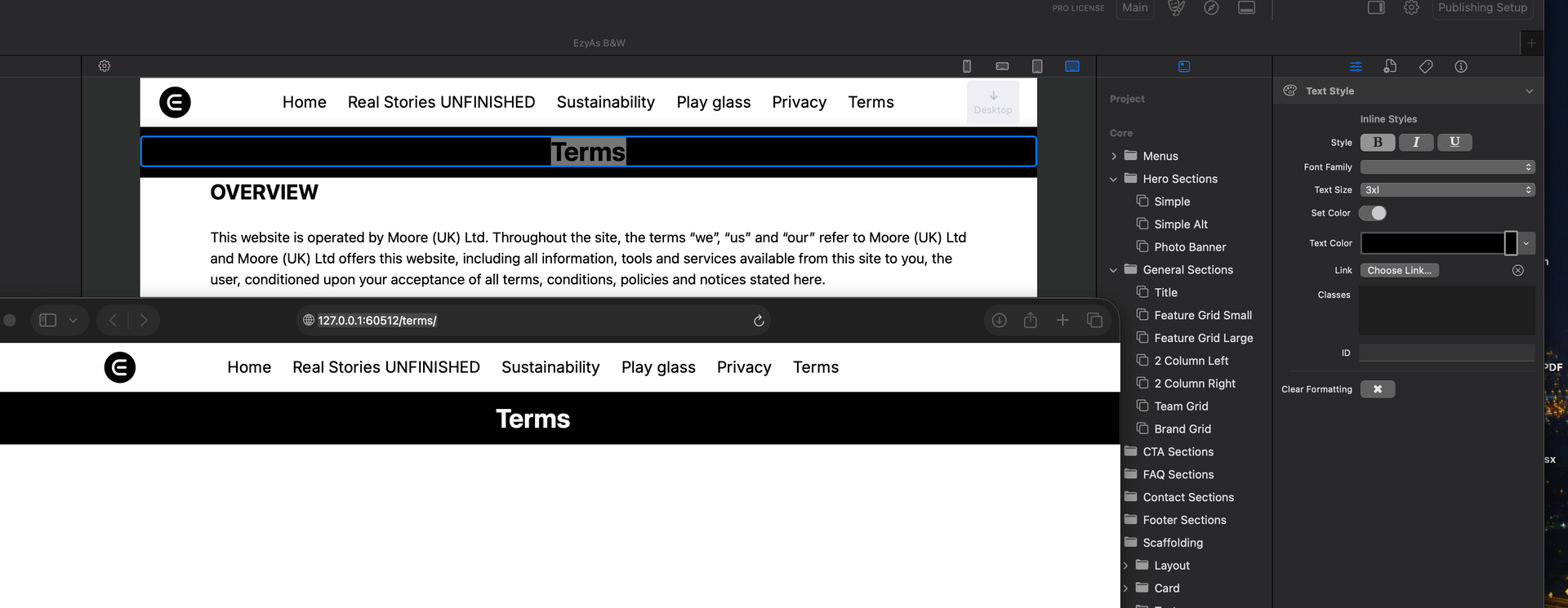
I have the “template” set up with sticky menu, body and footer etc and just copied the text into my container (body) The text shows up black as I want it but on preview its coming up white and unreadable. I have added a container with a black background just to show the word TERMS and if I add a background to the words below it goes up white on preview so its there.
I have all text colours set to black, however if I adda new text block and paste it comes up black but loses all the layout as is now. The image below top - app, bottom preview in Safari
UPDATE - if I highlight text and change colour nothing happens, however, if I highlight text and then turn off colour button the turn it back on it changes the colour but does not come up with the colour selected, so if I changee it to blue then black it goes black.
I could but I have fixed it by doing what I said above. I have copied three pages and its the same each time, have to highlight text, turn off colour, recolour and then go to black and it works.
@dan@ben knows about this one its the same bug I reported in the typography component not respecting light colours of dark mode is set to off in site settings.