jbob
September 24, 2025, 11:05am
1
Disappearing menu items
Dan - you gave me the following code in order to fix an issue where Paypal’s code was ‘disappearing’ the menu items. I’ve been unable to make progress with this. The menu items still disappear. Would you be able to take another look for me ?
Jol
/\* Protect Tailwind display utilities from 3rd-party \`.hidden\` rules \*/ @media (min-width: 1024px) { .lg\\:flex { display: flex !important; } .lg\\:block { display: block !important; } .lg\\:inline-flex { display: inline-flex !important; }
dan
September 24, 2025, 12:54pm
2
Hi @jbob ,
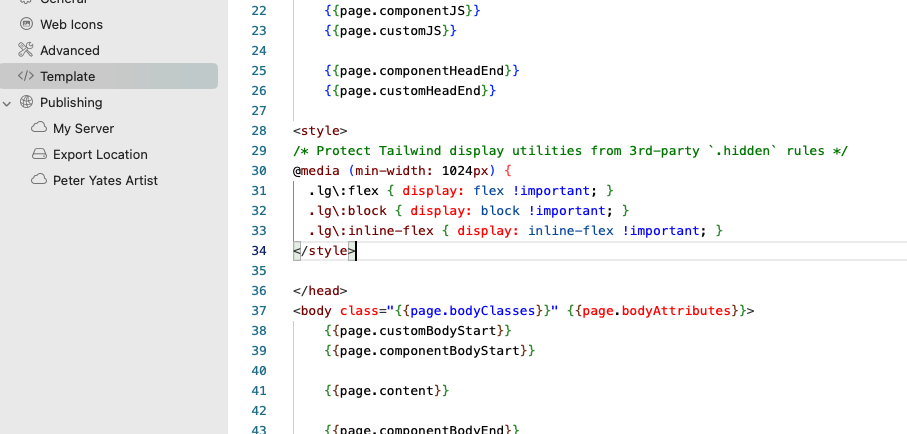
Make sure the code snippet is placed at the very end of the head area:
<style>
/* Protect Tailwind display utilities from 3rd-party `.hidden` rules */
@media (min-width: 1024px) {
  .lg\:flex { display: flex !important; }
  .lg\:block { display: block !important; }
  .lg\:inline-flex { display: inline-flex !important; }
</style>
Just before the closing head tag, like this:
jbob
September 24, 2025, 1:52pm
3
Ammended and uploaded… but result is the same on the Print Shop page : (
dan
September 24, 2025, 2:49pm
4
Can you share the latest project with me again, and I’ll take a look for you!
jbob
September 24, 2025, 4:39pm
5
Thanks Dan - much appreciated … I realise you have ‘a bit on’,
elementsapp://downloadDocument/CNrEZbT846zZ
Jol
dan
September 24, 2025, 5:45pm
6
It turns out we need to really make sure that css code is loaded last (after the PayPal buttons have loaded).
<style>
/* Protect Tailwind display utilities from 3rd-party `.hidden` rules */
@media (min-width: 1024px) {
  .lg\:flex { display: flex !important; }
  .lg\:block { display: block !important; }
  .lg\:inline-flex { display: inline-flex !important; }
</style>
Move the code out of the head are in the Template and place it at the end of the page in “Body End”.
And here’s a quick video explaining how to do it