Time is an hour slow - is this my server ?
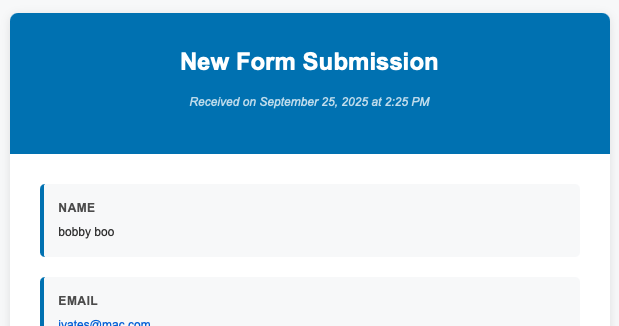
Good news is - my email does actually work !!
It is your server time. You can change the php.ini file variable for date.timezone = “US/Central” for example to a preferred time zone.
Some hosting providers may include as a list of PHP variables, etc….
The time is based on the server configuration — however, I am planning on removing that “Received on …” line as it’s redundant. All email services display the date/time of the email 
Good logic
Hi @ben
I was about to create a new post, but finally found this thread in a search.
The line is still there in messages coming from an Elements Form…and the time is off for me too. (See below). Possible GMT or UK time, while I’m in Eastern Time in Canada. ???

Thanks!

Maybe have a look at this when you’re in there.
By nice to have the header display the form name by configuring this one liner in the backend.
Success! Thanks @differentdan !
That said, it would still make sense if the timestamp went away.
And…it would be nice to have a bit more control over the appearance of the notification emails…or am I asking to much? (Or there is a way, and I’m just too green to know! LOL).
Cheers!
We plan on removing the time, and allowing you to customise the title in the email.
Look out for that soon-ish…
Is there anything you really, really MUST have?
Our own branding in the email would be very nice to have.

Many of my clients do not speak English. So everything hard coded in English would be good for me to define the text myself 