Hi Michael and thanks for you question.
The philosophy behind my project development is the same one I followed when working on RW Classic themes: the goal is not simply to provide a template, but a cohesive and complete product that includes all the necessary elements to build a real website.
Without these components, some essential elements would be missing, but this doesn’t apply only to the components themselves. The projects also include a ready-made Legal page and a Privacy Policy page, a popup to inform users about the site’s policy, and a footer with all pre-configured elements ready to be customized. The philosophy applies to the entire project, the components are just one part of it.

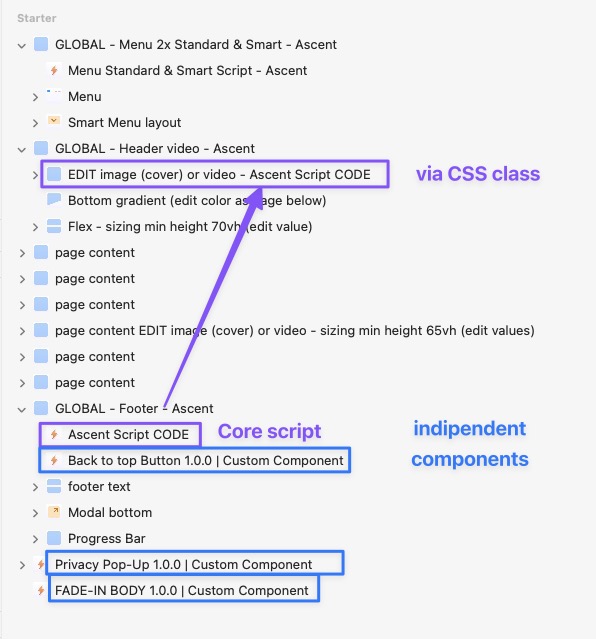
The components included in my projects are designed to deliver a result as close as possible to my previous quality standard. These components should therefore be considered as part of the overall project, but they can also be used in any other project. You can simply copy a component from the original project and paste it into a new one, it will work independently.

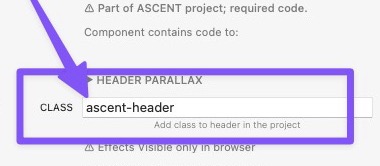
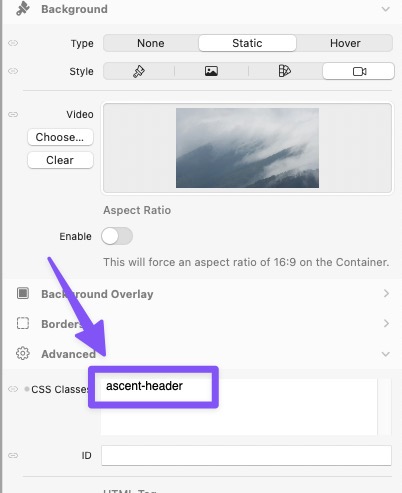
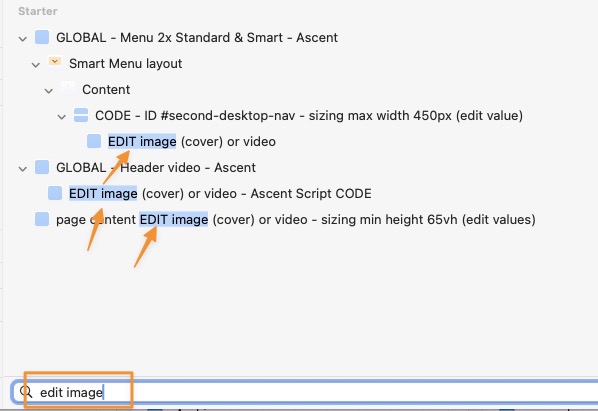
For the “CORE” component, however, I used a smart technique to extend the functionality of the standard Elements components through a simple CSS class. Each project includes a specific CORE component that contains the code required to modify the standard elements. Nevertheless, the CORE component can also be applied to other projects, though in that case, it’s advisable to copy the related standard elements that use that class as well.
in all cases with Core Component you can also change the class from the component panel if you use it in another project.
The demo projects will be updated (free) to include all the major new features of Elements, but only once those features are stable and finalized. This approach also helps avoid creating development issues for the RMS team, who are working hard, we just need to give them a little more time 
As I mentioned above, the philosophy is to offer a complete product, so the main font families are always included in the project to ensure it can be used offline 100% GDPR. The DMG packages also include additional fonts that you can replace if you wish. In any case, yes you’re free to change the fonts as you prefer, or use the ones provided by Elements or Google.
Thank you very much my recent work on Elements exists only thanks to the experience and foundation I built while working on RW Classic. 




 Multithemes Store