I'm very new and having trouble finding solutions

Elements is very impressive, but I’m not connecting some dots.

For instance, I started a project with the Voyager2 template. A sticky menu at the top of the main page says “Voyager2” at the left end. I found a switch to turn italics on or off, but I can’t find any occurrence of “Voyager2” anywhere except in the preview/edit window.

The text “Voyager2” isn’t editable there.

This particular situation is trivial, but I think I would gain understanding of Elements if I knew how to locate something and then edit it.

Many thanks in advance!

1 Like

Awesome! Many thanks!

Is there a way to change that field from the project title to arbitrary text not associated with anything else?

Just trying to learn (and escape Adobe, Canva, etc.).

Do you mean different on each page or something else

Let’s say I wanted to set the title on this menu to “Main Page” but didn’t want to set my project title to “Main Page.”

Just trying to learn, and very appreciative of your time.

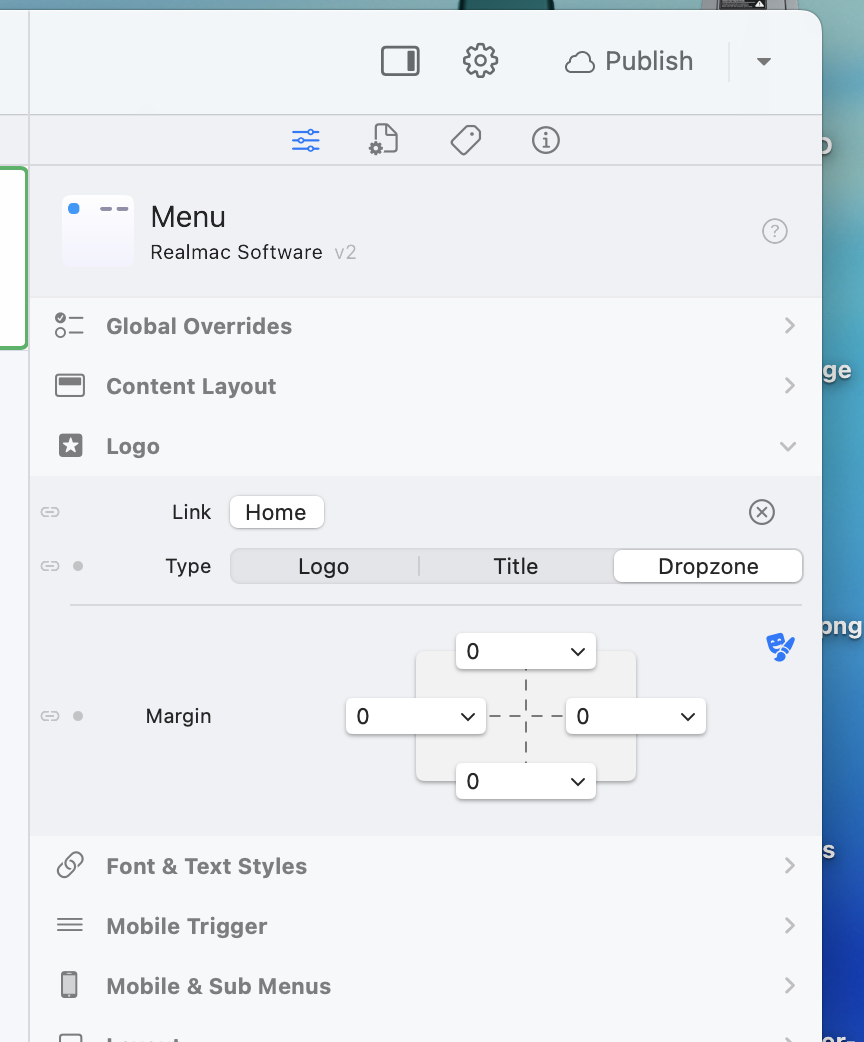
Switch the Logo the Menu to a drop zone, and you can put whatever you want in there :smiley:

beat me to it

1 Like

I see! Very silly of me to have missed that.

Thank you for your help. I owe you one, but I’m pretty sure it will be a while before I can repay you in kind. I’ve got a lot of learning to do.

1 Like

I had overlooked the obvious - the Logo section of the inspector with the menu selected had the option Title active, which I misinterpreted as a title for the menu, not the project’s title.

Is there documentation on components like the sticky menu in the Voyager2 project template?

For instance, what does the Logo selection do in the Logo/Title/Dropzone selector?

Selecting the logo option displays the logo you set for the PROJECT, if you have one.

Many thanks! I can see support here is as cooperative and friendly as in the Affinity forums of old, before Canva killed them. A shame, that.

Very happy to have found Elements.

2 Likes