Does Rapidweaver Classic run on Mac OS Tahoe 26?
Has anyone upgraded, and if so, did you have any issues?
Does Rapidweaver Classic run on Mac OS Tahoe 26?
Has anyone upgraded, and if so, did you have any issues?
You may have issues with RW/Stacks and FileVault. Tahoe turns on FileVault by default, if you were not using it before the upgrade then try turning it off if you have problems.
The latest version of Elements and Classic run just great on macOS Tahoe.
Thank you!
Stacks 5 ?
@dan would it be possible to send the crash reports to Isaiah, please? From my understanding he could not retrieve them in another way?
We used to send all the crash reports directly to the YourHead GitLab account, but at some point we got rate limited because there were just too many being submitted. All of those crash reports we submitted were just closed off as old bugs (even though they were unfixed). We also asked for an FTP account to automatically upload crash reports to YourHead, but we never heard back.
Unfortunately, emailing the reports isn’t a practical option. Stacks generates a lot of logging data. Many of the reports are hundreds of megabytes in size, and some even reached 4GB.
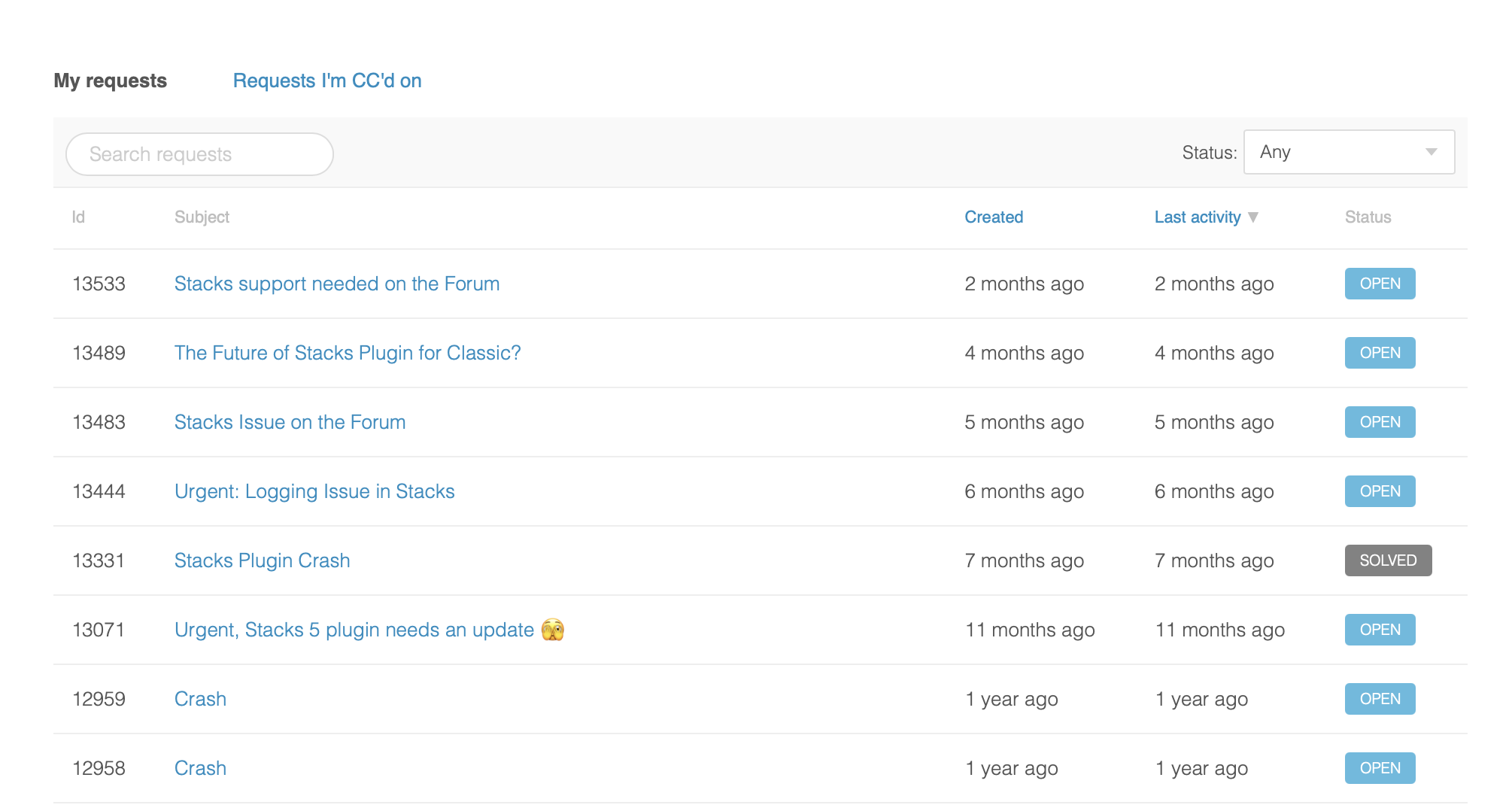
For context, here are the support tickets we’ve submitted to YourHead over the past year, most of them are still open, and without a response:
I’m not exactly thrilled about spending time sorting and submitting crash reports to a competitor, especially when there’s little indication they’ll actually be reviewed or that I’ll receive a reply. That said, if I thought it would genuinely help our customers, I’d do it.
It’s worth noting that YourHead appears to be focusing on building their RapidWeaver competitor, “Stacks App”, something I believe WeaverSpace encouraged them to do long before Elements even existed.
If YourHead provides a way for us to submit crash reports again, we’re more than happy to help. But… don’t hold your breath.
I would love to know how well Tahoe works on Intel too. Especially with all those wiz-bang interface features. Sequoia is working good so I plan to upgrade very cautiously!
I’m using a … 2019 MBP 16” with an Intel Processor. Tahoe runs fine, more or less. I sure notice that it requires some more power than Sequoia did. I can still work with it though and I did not change a lot of settings (yet).
Great! The new interface is a bit of curiosity to me. It seems like a second attempt at the aqua. I’m using a 2020 13” model.
Have now sent @Isaiah around ~10 recent crash reports, so hopefully we’ll see a Stacks Plugin update soon…
I hope Isaiah can make sense of the reports. With my crash reports, it probably wasn’t entirely clear for him, or he had trouble finding the cause, or couldn’t say for sure whether it was actually a stacks plugin issue.
Well… let’s give him some time to look into things… and keep our fingers crossed that he’ll release some fixes.
The crash report clearly shows it’s a Stacks plugin issue.
Yes, “the proof is in the pudding” as we say over here 
I’m running RW Classic 9.2.1 and have plans to pick up my new mac tomorrow. This thread has me a little worried. Converting my RW projects to Elements is taking a little longer than expected. I just need it to work long enough to get my stuff off RW.
You don’t need to worry. The new STACKS beta, which you can download here, works and runs very smoothly.
With this version of STACKS, you can work with ease. So you can fully enjoy RW-Classic on your New-Mac.
Must turn off FileVault or not?
no