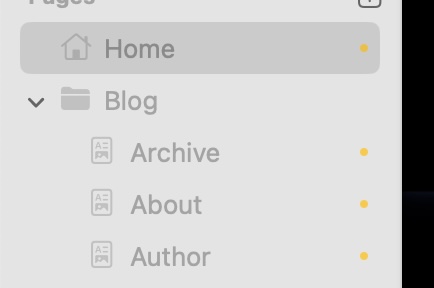
‘Top Pages’ Menu Element / Folder option … can’t get it to work : (
Is there a knack to it ?
The default Top Menu items option works great … but I can’t get it to specify the pages from a folder (in this case, I’d like to specify ‘Blog’ under which is Posts, About, Archives & Authors.
(It doesn’t work in Ben’s Blog example file either)
I may be mis-understanding what the ‘folder’ option is … but I believe it is what I am looking for in order to create a secondary menu system for my blog pages : blog, posts, archive, author & about.
For the life of me I can’t get it to work
Am happy to be wrong … anybody care to tell me where I’m going wrong ?
I saw this earlier and had never seen or used the Top Pages component so did not answer but I think what you need is this.
Right click on Home under your file structure. Select New Folder. Rename the New Folder to Blog or whatever. Move the other pages such as Archive, About and Author under Blog. You will get Blog in the menu and when you click on it the other pages will drop down.
a.) It doesn’t work here - though I am prolly being daft
b.) I don’t really want my blog to be in a further sub-menu (isn’t this what putting it in a folder does !?)
c.) What I’d really want it to specify a menu item (ie Blog) … and all items sub to that (archive, about, posts etc) should appear with it as menu options (in my new secondary menu)
As far as I can see, the Menu component does not allow you to specify the content of the menu (- it just shows all menu items that are marked as visible)
Ben uses ‘Top Menu’ to show the menu items : Blog, Archive, Posts (in his Blog demo video)
However, Ben doesn’t have a Main menu - or rather, this is Ben’s Main menu !
What I’m looking for is a secondary menu (sitting further down the page) that allows me to show just the Blog and it’s associated pages (ie Blog, Archive, About etc)
It does not. You can put a folder of pages in the top pages component, but it won’t show any submenus (folders within folders). I ran into that and @ben helped with a custom component (@ben, check your email!!) for what I needed to do.
Be aware that you can also use the Top Pages to display LINKS that you create, so they could be links to anything, including the pages you want to display. Just place them in a folder and then select that folder in the Top Pages component.
I use this all the time to display links in my footers. Bottom line is the Top Pages component definitely works using a folder.
I have also used it to display in-page navigation links using anchors. It is a convenient and powerful component.
I’ll look at your second example shortly - thank you for that.
Aligning a tool’s function and customer expectations (I can only imagine) is really hard - and for some reason I saw this tool being more straight-forward. That the help was disconnected makes it harder.
From RM’s perspective, aligning function with expectations will save them a mega-ton of time in support (and speed up the maturation of Elements).
So -
Since in ‘subbing’ from a menu item, you’re effectively putting the sub-menu items in a folder of that menu … I wrongly assumed that specifying a menu item in ‘Top Menu’ would just incorporate it’s subs (the folder contents). I dont think this an unreasonable assumption.