Yes, you can trigger a modal from a link or button elsewhere on the page, but it does require some custom code.
 Important Note: This technique relies on the internal structure of the Modal component and may break in the future if we update how modals work. Use with caution.
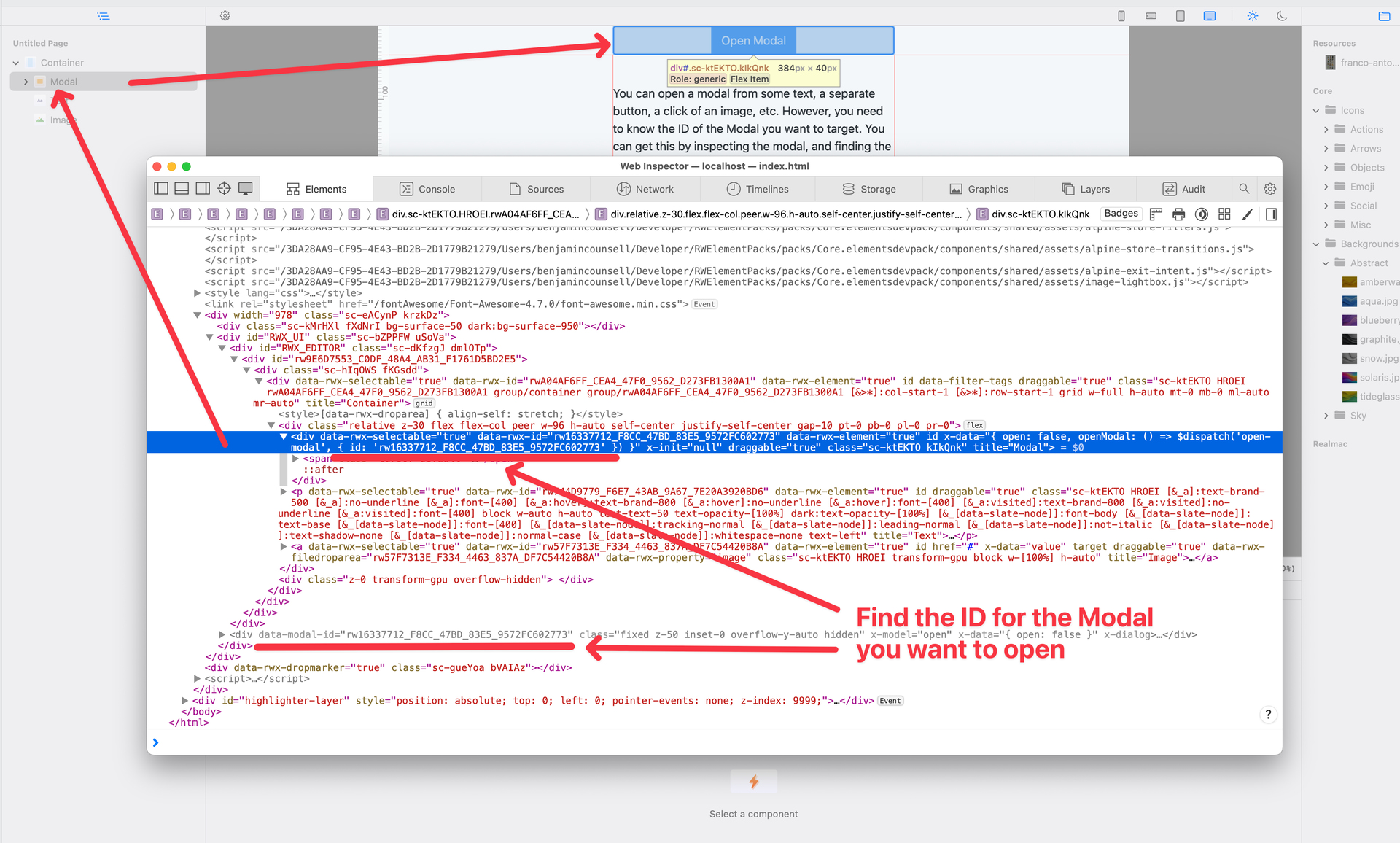
Step 1: Find the Modal ID
Before you begin, locate the ID of the Modal you want to open. You’ll need to use that in the code examples below.
Step 2: Trigger the Modal
You can trigger the modal by dispatching a custom event named open-modal on the window object. There are two approaches:
1. Native Javascript
<button id="openModalBtn">Open Modal</button>

<script>
  document.getElementById('openModalBtn').addEventListener('click', function () {
    const event = new CustomEvent('open-modal', {
      detail: { id: 'THE_MODAL_ID' }
    });

    window.dispatchEvent(event);
  });
</script>
2. Using Alpine
<div
  x-data
  @click="$dispatch('open-modal', { id: 'THE_MODAL_ID' }">
    Open Modal
</div>
You can download an example project using this technique here. Enjoy! 