I am getting this error when publishing my site to a local folder:
It appears I can publish individual pages. I haven’t worked my way through them all yet to see if it is a specific page that is causing the issue but will do after posting this.
The only change I have done is to my menu DevPack which was very minor in nature.
This Devpack is used on the individual pages I have successfully published.
As an aside, I think it would be useful if the View Issues button was made visible regardless as to whether you hover over the error message or not. It wasn’t obvious that I had to do this to find out what the error was and discovered it by accident.
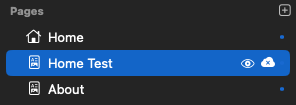
I have managed to individually publish all the other pages but not this one (which makes sense). The only downer on this investigation was that I was working my way publishing the individual pages from the bottom of my list of 28 pages, to the top, so it took a bit of time to discover this as the problem page as it was was number two in the list!
When I flipped it to publish then my Publish All worked for the whole site.
If I try and individually publish the page marked as ‘Do Not Publish’, I get the error as originally reported.
I suspect this has happened since version 1.0.9?
UPDATE
I can replicate this issue using the North Eleven website downloaded from the Marketplace. The error occurs if I select the Portfolio page not to publish.