@dan I downloaded a clean copy of CMS and saved it unadulterated as a play file. I then added 1 author and 1 post only. Go to preview and fine everything as should be. I then close file down completely. I then open the clean unaltered file and thats perfect as downloaded. Preview this file and the post and author I added are shown on preview. Then cleared cache, restarted computer and the same thing happens open clean file only. - no other projects open, and the post and author are still there from play file. Do I need to do something to clear old files before starting again? TIA
@dan any update on the above please and thanks!
I’ll be honest, it’s hard to tell exactly what you’re doing… the project file with steps to reproduce the issue would be really helpful for us!
Alls I did was opened the virgin file as downloaded from site. Nothing else open just this file.
Saved it as a play file in this file I just copied 1 post and one author. I then changed the name and added a jpg picture and changed path to that picture. Nothing else at all. Opened it and it’s 100%as it should be.
Closed the file nothing else open and opened the virgin file on preview the new author and post is in preview. But I only gave virgin file open.
So cleared cache it’s still there. Rebooted computer opened virgin file and the preview still shows the added author and post in listing.
So my question is do you have to do something else to clear the virgin file preview showing “incorrect” information ie added author and file?
I am just about to add 20+ authors and want to get it right before starting mass changes.
I can send the file tomorrow but it’s just the virgin file from dev diary when launched.
TIA
Sorry for not getting this to you sooner but BH weekend took over. So today I have closed Safari and Elements completely. I have downloaded the clean CMS data and opened it in ELEMENTS. Left side of pic, you see that there are three authors as per virgin download. On opening preview (right side of pic) you will see I have 4 authors, this is the author I added on Friday and I have not opened this file to do this test. I cleared cache and re started computer. I am using v1.1.12 and the extra author still appears when viewing clean virgin file of CMS. TIA
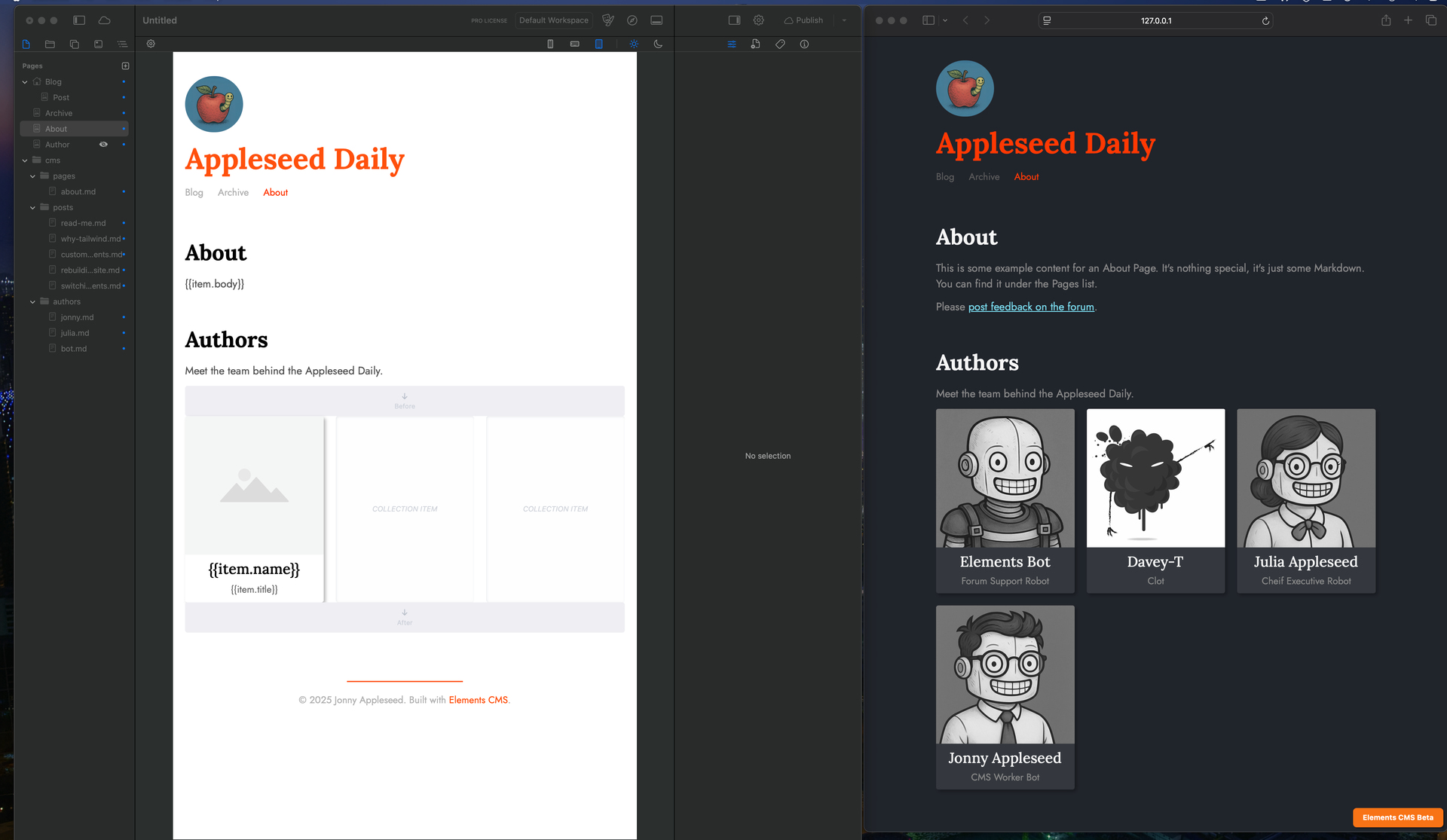
Whilst I appreciate you are busy with other things have you had a chance to look at this as I have my real project I want to start and have 20+authors to add but need to know this is not going to happen as I have three different sites I am playing with to add CMS to and crossover problems I do not need. 
I dont wish to be a stalker but I want to get on with my CMS update this weekend but can not start until this is sorted. Have you had a chance to look yet? TIA
Now I am a stalker! It’s 10 days and I am not able to continue without knowing why this is happening? Please help me. TIA
I’m not sure what’s going here, and haven’t managed to reproduce your issue.
It sounds like a local caching issue, and won’t happen when you publish online.
I have cleared cache and restarted computer twice and it still the same I have deleted both files and retried with fresh files and still the same. I will try the publishing route tomorrow. THANKS
Can you try the following:
- Close all open projects in Elements.
- Quit Elements (this should clear the preview cache).
- Re-launch Elements.
- Then re-download the project.
- Try Preview again.
Can you let me know how you get on.
I have done all this twice so I have just tried it with latest download ( Audio additions) and it’s gone and all is fine. THANKS for all your help - Audio additions look good! Keep up the good work.
We figured out why you were still seeing this issue after “rebooting”.
If you had Elements open, and restarted your Mac. The System will “freeze” the app, and “unfreeze” it on reboot. Thus the app will never actually “Quit”.
Elements clears the preview cache when it quits. This is why the problem resolved itself for you when you installed an update to Elements as it needed to restart the app to apply it.
We’re implementing a fix to catch this edge case, so it won’t happen again.