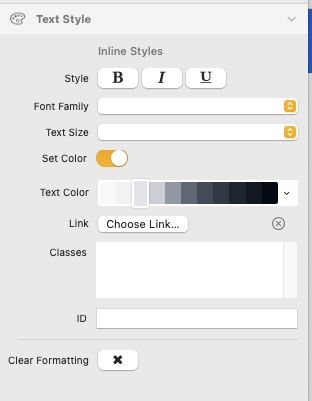
I have Elements 1.4.4. For text, the Text Style box shows a slot for fonts, but scrolling in this, there are no fonts available.
Where are the fonts?
I have Elements 1.4.4. For text, the Text Style box shows a slot for fonts, but scrolling in this, there are no fonts available.
Where are the fonts?
Check the manual - I just learned last week  this is for entering your own purchased fonts…
You can find the comprehensive guide on using fonts in Elements in the Font Family section of the Elements User Manual.
It covers everything from setting up custom fonts via the Font Manager to using Google Fonts and managing typography with ease.
@michaeldroste This leads to a “Page not found. The page you are looking for doesn’t exist.”
@traut You may want to have a look at Font Family | RapidWeaver Elements Docs
Originally I had the same result as Drosty: “Page not found”
However, your suggestion got me to some info about fonts.
I am supposed to move a font to the CSS, but multiple times is “CSS” used in the videos without ever explaining what it is, or how to locate it.
Sorry used the robot for the information…
MichaelDroste:
Fonts manual
elementsbot:
You can refer to the Fonts section in the Elements Manual to get detailed instructions on managing fonts within Elements. Here’s a quick recap of the essentials:
Font Family: Choose from built-in font names, Google Fonts, or add your own using the Font Manager.
Custom Fonts: Add local web fonts like .woff, .woff2, and .ttf via the Font Manager. Drag and drop them into the Theme Studio.
Best Practices: Use WOFF2 format for optimal browser support and performance.
Theme Integration: Fonts and related settings are managed through the Theme Studio for a consistent and adaptable design.
If you need any further help or specific examples, don’t hesitate to ask! 
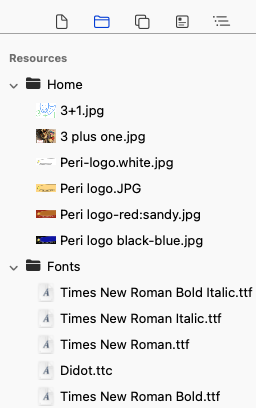
I have managed to import a font folder into resources.
But, when I select some text and choose Times New Roman.ttf, the text does not change its appearance.
The text menu at right says it is Times New Roman, but it has not changed appearance.
Also, I can’t find any way to center text.
If I just click on a text box this comes up and alignment is at the top.
I suspect you are highlighting actual text and you get this -
The only time I use that second box is when setting a link, other than that I don’t know what it is for. Rightly or wrongly, if I want text to be formatted differently to other text I will have it in its own text box.
Not sure if it matters but all the fonts I have imported successfully are OTF files not TTF. I don’t know if this is an issue or not.
I see the box that you attached, but under fonts no fonts show up, even though I have a font folder in Resources.
I will talk you through what I did.
Click on the face/brush icon at the top of the screen-

Click on Font Family. Click on the + button next to Custom Fonts.
In the drop down box to the right select Font Resources. Now drag the font resource from the tree on the left where all the other resources sit.
Give it a name and then close the box. That font should now be showing under your fonts?
I learned how to use fonts - tried them out…
Then went back to ‘system’ font - lol  don’t know if I got too used to it or what - they other fonts seem to look strange or harder to read…
Funny how you get used to a font…
OTF appears to work fine even if not a supported format. Certainly not going to go back and convert them all to WOFF2.
@traut You need to add a new Custom Font in the Theme Studio, details on how to do that in the link below.
Also, @jbyfield gives a good demo of how to do it in the comment above.
Your answers are too succinct. I have a fonts folder in Resources, but see no fonts option in the Text window at right.
Where is Theme Studio for fonts?