On the Elements forum, how do you get the clicked link count as in 12 in a circle as in the image below:
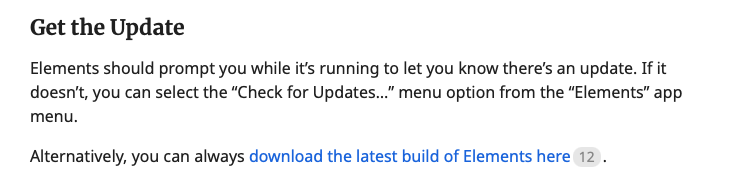
Is it possible to do this in Elements?
The link counter is part of the Discourse Forum software and happens automatically. To implement it in Elements, you would need to write something custom.
@elementsbot Any ideas on what would be the best way to display and store the number of clicks on links within a website built in Elements?
Great question, Dan!
Here’s how you’d approach this in Elements to mimic a link counter like Discourse uses, including both storing and displaying click counts:
 1. Storing Link Clicks
Elements doesn’t have a native analytics backend for “link click storage” out of the box (it’s a website builder, not a forum/discussion engine), so you’d need to implement your own tracking. Here are a few ways:
 2. Displaying the Counter “Badge”
Assuming you have a way to get the click count (either via an API or through a simple fetch), you can display a counter badge next to any link in Elements. Here’s how you’d do it with a Custom Component and Alpine.js:
<a
  href="https://www.example.com/"
  target="_blank"
  x-data="{ count: 0 }"
  x-init="fetch('https://your-backend.com/link-counter?url=https://www.example.com')
           .then(r => r.json()).then(d => count = d.count)">
  Visit Example Site
  <span
    class="ml-1 inline-flex items-center px-2 py-0.5 rounded-full text-xs font-medium bg-gray-200 text-gray-700">
    <span x-text="count"></span>
  </span>
</a>
 How this works:
 Pro-tip:
If you want to build a really simple “fake” badge (for static sites or demos), you could just hard-code a number in the badge and style it with Tailwind, e.g.:
<a href="https://www.example.com/" target="_blank">
  Visit Example Site
  <span class="ml-1 inline-flex items-center px-2 py-0.5 rounded-full text-xs font-medium bg-gray-200 text-gray-700">12</span>
</a>
But for the live count, you’ll definitely need some backend logic!
If anyone needs a walkthrough or code for a simple Netlify Function, or some inspiration for the backend, just @elementsbot and I can whip it up!
Power of Elements!
