Elements 1.4.4 (23906)

Hello again,

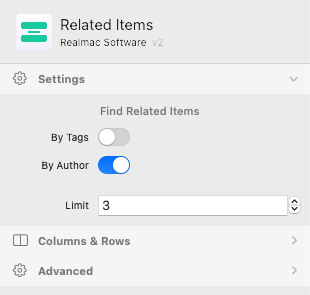
If you use the CMS, especially the related items components, this build is for you. We’ll be back soon with some MUCH bigger updates :thinking:

What’s New in Elements 1.4.4?

  • Fixed numerous issues with the Related Items component, including showing related images.

Purchase a License

You can visit the Realmac Software website to purchase a license.

Get the Update

Elements should prompt you while it’s running to let you know there’s an update. If it doesn’t, you can select the “Check for Updates…” menu option from the “Elements” app menu.

Alternatively, you can always download the latest build of Elements here.

Give Feedback

If you are running a licensed copy of Elements, please post all feedback in the Feedback Forum. You can use the Elements > Send Feedback… menu item to automatically pre-fill the build number into a new topic.

Wasn’t expecting this - nice surprise :slight_smile:

Having problems updating. Fails when trying from inside the software, and the link in this post does not work. Hmm.

@dan & @ben Guys, no idea what you did — unfortunately, nothing in my CMS works after this update.

Neither images, headlines, no body text are showing up…

1 Like

Hmm, that is odd. Could you send me your latest project? I’ll check it out this evening and see if I can figure what’s going on!

@ben It’s exactly the same file I sent you via email on November 2, 2025 —

subject: “Re: Related Items Elements 1.4.3 (23902)”

It looks like the following frontmatter setup is no longer being recognized:

headline:
    long: "Organize your photos with ease using these great apps"
    short: "Organize your photos with apps"

description:
    long: "fringilla, facilisis augue sociosqu tempor ultrices nisi scelerisque"
    short: "fringilla, facilisis augue sociosqu tempor ultrices nisi scelerisque"

It’s even happening with your Appleseed sample blog Ben, all but one of the author names are missing from the posts. Julia seems to be a bit more resilient, but the bot and Jonny are toast :confused:

So sorry, we’re working on a fix now, in the meantime you can roll back to a previous version: https://www.realmacsoftware.com/rapidweaver/releasenotes/

Yes, somewhat better for me now

When I specified ‘Related Items’ … ‘By Tags’ … I was getting poor results

(… could it be ‘by tags’ isn’t implemented fully - or perhaps some of my tags are missing ?)

When I specified ‘Related Items’ … ‘By Author’ … I got better results

(…they are all currently set with me as the author)

How can it be that you can set ‘by tags’ and ‘by author’ at the same time ? … does that even make sense ?

Where there are lots of results for me as author for example - it should randomly pick out 3 posts from total posts

We’ve located and fixed the issue, and will be shipping a new build shortly. Sorry for the inconvenience!

1 Like

Yay, thanks Dan, look forward to the update :+1:t2:

It was kinda working … now not again - tried restarting

Fatal error: Allowed memory size of 134217728 bytes exhausted (tried to allocate 262144 bytes) in /Users/Jol/Library/Containers/com.realmacsoftware.rapidweaverelements/Data/tmp/RapidWeaver/989/RWDocumentPagePreview/document-E797657D-B4DB-434E-8805-31C722504119/rw/elements/com.realmac.corepack/api/vendor/symfony/yaml/Inline.php on line 318

@Pegasus @Al_Heron - try the newly released 1.4.5 build, it should fix the CMS issue for you :sweat_smile:

@dan Thanks for your late-night effort and the update.

Under version 1.4.5, my frontmatter setup now seems to be working again — the headline, image, body text, etc. are all being displayed properly.

However, in this version, no related items are showing up for me.

For now, I’ll stick with version 1.4.2 of Elements. In that one, everything works except that the number of related items isn’t correct.

Maybe you could release another update based on version 1.4.2.

Super, glad to hear that’s working as expected! :sweat_smile:

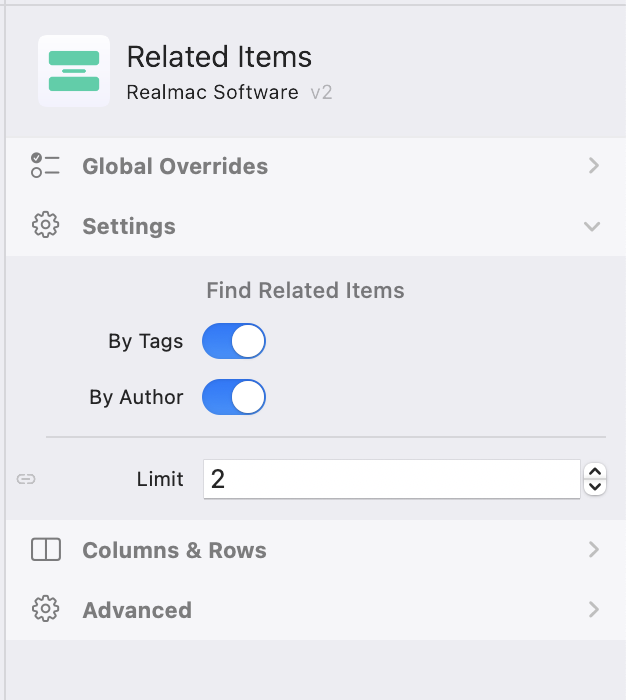
I checked your project again, and the reason no related items are appearing is that both “By Tags” and “By Author” are enabled in the Related Items component.

When both options are selected, the component only displays posts that match both the same tags and the same author. Since your posts don’t have any tags assigned, there are no matches, so nothing is shown.

To fix this, you can either add tags to your posts or simply disable the “By Tags” option in the Related Items settings.

When I go to my blog … menus freeze and I get a fatal error … any idea what resources need sprucing up ? Thanks if you can help anyone ??

I’ve undoubtedly done something silly whilst fiddling about : /

https://www.peteryates.co.uk/blog/

Fatal error: Allowed memory size of 134217728 bytes exhausted (tried to allocate 12288 bytes) in /Users/Jol/Library/Containers/com.realmacsoftware.rapidweaverelements/Data/tmp/RapidWeaver/6999/RWDocumentPagePreview/document-03B23855-87F9-44D7-8EEF-150AF87FC0B3/rw/elements/com.realmac.corepack/api/vendor/nette/schema/src/Schema/Elements/Structure.php on line 38

elementsapp://downloadDocument/oa7SznGmRZy3

https://www.peteryates.co.uk/blog/

@ben you’re actually right. I had my frontmatter set up without tags. I’ve adjusted it, and now it looks like everything is working as it should.

If I notice any issues, I’ll get back to you.

Thanks for your time and effort!

1 Like

Hi @jbob

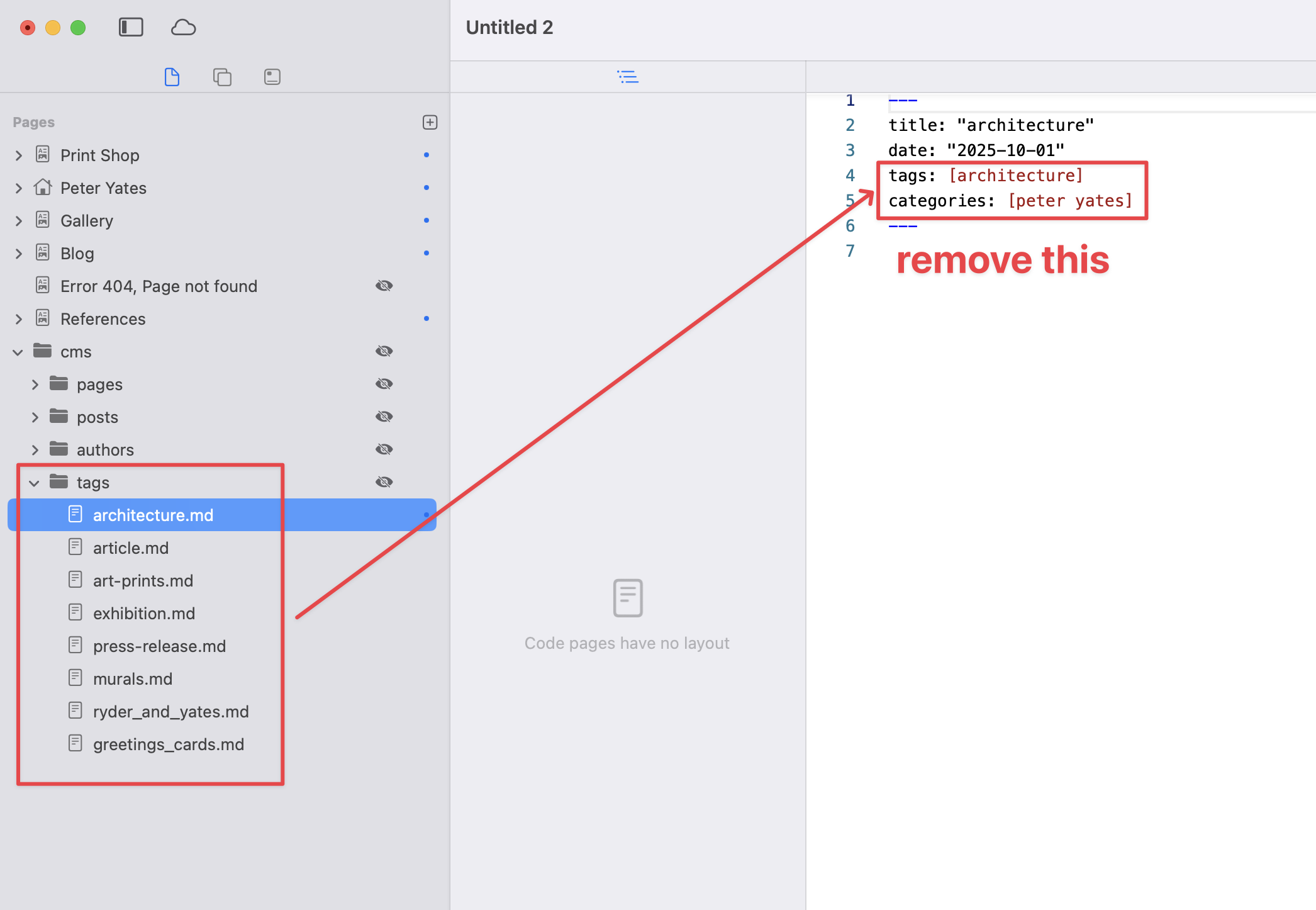
The issue is that your tag markdown files include tags themselves, which causes an infinite loop — the CMS keeps trying to attach tags to tags to tags… and eventually runs out of memory.

To fix it, simply remove the tags and categories properties from all files inside your tags/{tagname}.md folder. Once that’s done, everything should work as expected :slightly_smiling_face:

Thank you so much Ben !!