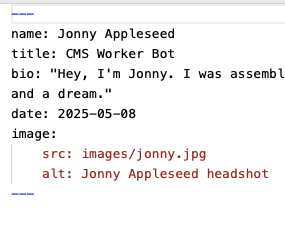
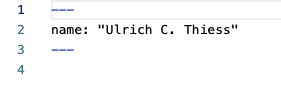
I understood that if I have an “authors” subfolder containing Markdown files with the same name as the author specified in the post’s Markdown file, then {{item.author.name}} would automatically retrieve the “name” value from that author’s Markdown file.
However, this doesn’t seem to work in the Appleseed Daily example.
Just had another quick look at this and it could be a bug with the author markdown file and only having the first name, so jonny.md instead of jonny-appleseed.md — I’m going to file this one as a bug and investigate ASAP
No, sadly not. Just have a look at you demo project. In the authors MD-File the name is Jonny Appleseed. Should it print out only Jonny or Jonny Appleseed?
Hi, is it just me or is this broken again in 1.5.2? I’m following the video tutorial and neither the author name nor the author image pull through as shown in the video.
What I don’t understand is the demo shows the authors in a folder ‘authors’. How does {{item.author.name}} know to look up the author details in that folder? Is there a step that I’ve missed?
There’s no additional steps, the authors will be hooked up automatically (so long as there is an authors folder at the same level as your collection items).
The CMS will then automatically try and find an author markdown file that matches the author name set in the collection item’s frontmatter.
If you could share your project with us, using Elements Cloud, we can take a look and see why it’s not working for you
I found your examples really helpful. It turns out that I’d missed the '“.md” extension on the author file and therefore it wasn’t picked up. Adding that fixed things.
And thanks @ben for the explanation of how it works.
The image file in the author file gave me some problems but I’ve just realised that the link wasn’t using the correct syntax. All good now!