Hello,
Can someone help me with a jumping footer.
It happens when I place a stack into RW, when I take it out, the footer is along the bottom, where it should be.
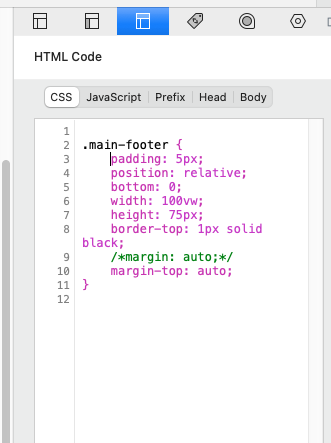
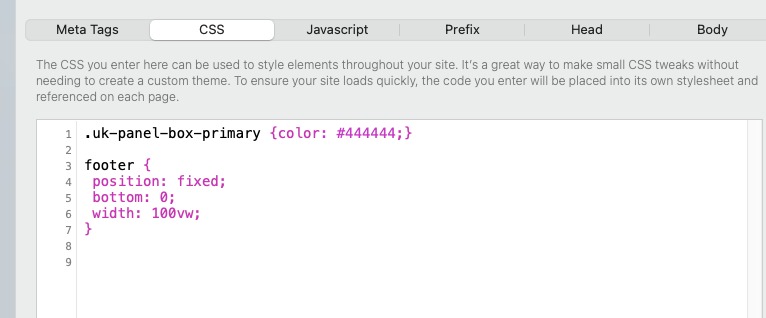
I am trying remedy the problem with css code. If one of the codes below is okay, where should it go please?
Hi @pottedwires,
- What did you use to build the footer?
- And what stack is causing the displacement of the footer when added to a page?
You’ve already put the code in the correct place by the looks of it. Assuming that your footer indeed has the class “main-footer”, it will target your footer and set the margin for the top to ‘auto’ and the position to “relative” (along with everything else you’ve defined, but those do not relate to the positioning).
However, “position:relative” will likely not give the effect you’re looking for (unless I misunderstand your question). You actually want to force the footer down to the bottom of the document (not the viewport, which is you visitor’s browser window, but the document).
You could put all the other contents on your page in a container and class that as “page-content” (for example) and leave the footer out of that container. Then set the CSS to have “page-content” fill out all the white space below by using a flexbox:
html, body {
  height: 100%;              /* force body to fill the screen, so that flexbox can measure things */
  margin: 0;
}

body {
  display: flex;
  flex-direction: column;    /* turn the <body> into one large flex container, and stacking both contents (page-contents and main-footer) vertically */
}

.page-content {
  flex: 1;                   /* force the page-content container to take up all remaining vertical space */
}
This way, when your content is long, your footer is at the bottom of the page (after all content, and you scroll to reach it), and when your content is short, “page-content” stretches to fill the viewport, so the footer still sits visually at the bottom of the screen instead of floating halfway up.
Cheers,
Erwin
@Heroic_Nonsense Wow! Thank you for your suggestions. I will try them out, and get back to you. Kind Regards
@Heroic Nonsense, If anyone else if having the same issue, please try the solution above from solution above from Heroic Nonsense as I am sure it is an excellent one. I will mark it as a solution for others.
I tried this, but it did not work on the website I am working on, but this could be due to a ‘breaking change’ and ‘deprecated feature js error’ that I recently noticed in the developer javascript console.
I spent quite some time researching and trying and trying out different methods to clear the error message, and to get the footer back in the correct place. It has been suggested that the error is due to the theme used, Flood Theme.
Are there certain themes that have recently stopped working? Please let me know?
I have found Flood Theme to be brilliant for the website I work on for years, and only recently have I received this error.
Going forward, I have tried out some Rapidweaver themes, where the error message appears in some and not in others.
Has anyone else recently received the error message in any themes?
Please note: I do not want to purchase any other themes or plugins at this time.
Update
I received additional information, that there was probably a conflict with the new plug-in, which affected the theme.