Yup, you heard that right. No more dev diaries.
Watch the video below to find what’s next…
Yup, you heard that right. No more dev diaries.
Watch the video below to find what’s next…
Nice! I’m looking forward to seeing the new podcast, even though the videos have been very useful so far. 
For the internal store, I’m eager to see how it works and hope to add some components myself soon!
I’m also waiting to see the new package  I’m trying to understand how it fits compared to my models and those from other developers. I’d like to keep creating them, but it depends on how things will be managed, and it would be a shame to stop producing good design for Elements.
Any additional information would be welcome, it would be useful for those already selling in the store.
Thanks and keep up the good work!! 
Looking forward to the new Videocast!!
I don’t think I like this idea for the same reason that I’m beginning to not like this forum: basically you’re just changing the name in which you’re dumping information, rather than actually organizing it.
I do not want to sit through you and Ben discussing Web site design generally in order to see/hear the one snippet of information that’s truly relevant to me in “this week’s podcast.” What I really want is:
The problem is that everyone wants do the community thing and have a general catch-all podcast. I don’t have time for that for all the interests that I have. I’m starting to turn my attention to just those things that actually have high content value for my time spent, and I just don’t see what you described as being that.
I agree. I do a lot of content sifitng these days, especially with U.S. politics (tuning out the stuff I already know and that breaks my heart.) We have less and less time available to us, what with all the distractions and obligations so, @dan I would say just listen to your customers on this.
In fact, I would say that the bullet list @thominator gives us here would make for a great ‘set list’ to consider for each ‘cast.
BTW, this announcement brings back memories of 2015’s The Rapidweaver Show. Enjoyed those podcasts.
Until we see th first pilot I can not really comment. However the community is growing and we have people who have different backgrounds coming on board and with specifically ELEMENTS are at different points from newbie to master. There also seems to be repetitive themes in the questions in forum either by not searching past posts or more importantly what people really need. The marketplace should resolve some of the major requests and give developers ideas where to focus. The DevDiaries are great learning material especially for new Elements users and as a saddo i have an excel spreadsheet with a link and description to each one which I dip into when stuck. So we wait and see whether you and Dan can “get” what us users need from basic to master. I have suggested in past that the community needs a few more tabs and become more specific than having an all in one solution.
This makes sense. I can see the need to just talk about the web design environment broadly in podcast format. For a while I thought about earning a certificate at my school where I could talk to others about web design but I’d love to do that from the makers of one of my latest web design tools.
This sounds a little bit like an advanced feature manual? For the software…
Perhaps that can be added?
Dear Dan,
I bought elements to survey or I would like it. The answer is no. Elements is far to difficult for me.
I hope you support Rapidweaver in the future, because that is the programm I use.
The url’s are: www.jacdebruin.nl and www.centrum-oost.nl
I’m curious about your reaction.
Greetings,
Jac de Bruin
Jccdebruin@gmail.com
I bought it too and decided against it….
Dan later did a video RWC site to elements….
Not saying it will solve your issues or problems, but might be worth a look.
it’s dev diaries 91
It is faster to the customer - faster loading pages, more efficient code and many other nice features
Give it a look…
I saw how easy he made it look and made the switch…
I found I had the exact same experience with Elements as I did with Rapidweaver. Didn’t know where to begin but stuck at it, ignored the frequent thoughts to just give up because it was too hard, started simply and slowly developed my knowledge and ended up being a competent user.
If you made those two sites in RW then you are more than capable of making them in Elements. Whether you need to or not is up to you, there are a lot of pages to convert.
I am with you @MultiThemes. Was a bit suprised to see the Pro Package and was trying to understand how this compares with my templates.
It would be good to get any additional information. Until these informations are available I will not spend any further minute in developing for Elements.
I don’t think  they would intrude into your areas and businesses….
Just hopefully easier to use sections that can be inserted… (my guess)
I like both of your products very much and would hate to see you leave elements…
Best Wishes to you both
-M
Just my two cents — I’m not really interested in being entertained. I’ve mainly used the videos as demos. It’s already been mentioned that they’re getting a bit hard to navigate, and it can be difficult to find what we need.
Attaching a short demo video to the User Manual for most key topics could be really helpful — something concise, clear, and purposeful.
A long, chatty podcast just isn’t for me. My day is already packed, and I don’t have time for that type of media.
Again, that’s just my opinion — yours may be different.
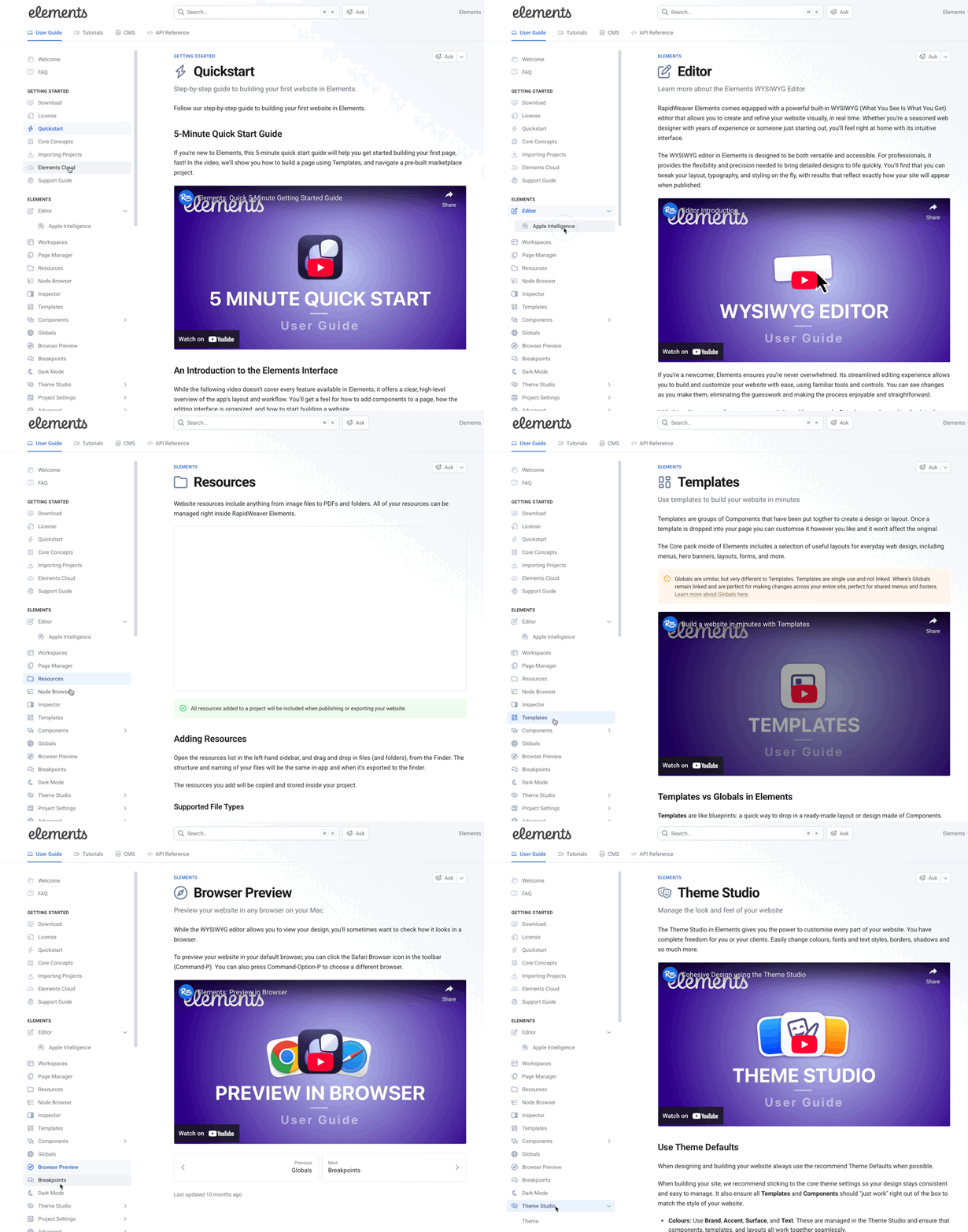
That’s exactly what we’ve been doing and will continue to do until EVERY section of the manual is filled out in detail along with a dedicated video.
We’ve made consistent progress on this since we started. So far there are 41 dedicated videos for the manual, with many more in the works.
Dear Jac…
in many cases I too have the feeling that new alternatives are much more difficult than sticking with my current software, techniques or workflows. But in most cases it is just in the very beginning I do not want to spend the time and effort to learn something new.
So I understand your opinion.
However in almost all cases that I decided to spend the time learning something new, I am happy I did. And if I did not take the time, I mostly have to regret that I did not. Things tend to become more and more time-consuming or even unusable after a longer period of time and so the initial time to learn pays of after a while. And the feeling of “I don’t know how to do it” is replaced by satisfaction on knowing how to achieve results even easier and faster. Especially in usage of software these days, learning new techniques, frameworks, applications, languages etc. is something I see as “normal”.
Regarding Elements vs. RV Classic: I have used RW Classic and now own an Elements licence to implement ALL my new static websites. I think Elements is far easier and far more powerful than RW Classic.
This is just MHO.
So I would suggest that you simply start with a small part of one of your sites and try to implement this part in Elements.
If it is not 100%, do not worry… maybe it is even better now regarding speed, layout and workflow 
I recognize that you used the Lumi lite theme on your sites.
So you are even more lucky: there is an Elements theme Lumi in the Elements marketplace, which might help you for a smooth start. It is a paid theme however. But maybe the price is acceptable for you?
I also found the learning material (User Manual including videos) by Dan and Ben extremely helpful
and there are plenty of friendly experts here in the Forum.
I wish you happy weaving with Elements… (assuming you follow my path
Hans
I bought the full Pro version on today’s 20% deal for a couple of reasons. I asked a newbie question in these forums and was treated with respect and because I decided to trust that the product would prove a powerful tool.
There was something wrong with my trial installation, which I put on my Mac’s Desktop. I couldn’t drag an image to a blank page. I’d get a box with a little question mark in it. I figured there was some magic combination of containers and layout grids that would get images to actually appear. I didn’t realize that what I was seeing wasn’t learning curve complexity, it was a failed installation.
Tutorials don’t address getting started as well as I’d like to see. There’s no cut-and-dried here’s how to do something simple, like make a web page with a single image. I’m intrigued by the CMS facility, but I don’t think I have enough information to use it without trial and error.
If there was a tutorial - and there may be, I’ve only scratched the surface with Elements - that took three Markdown files and made a plain web page with nothing but the CMS featured, that would be great.
I’m very new to Elements and hope some comments from the perspective of a blundering novice may help.
Hi  and welcome go to the YouTube Dev Diaries for Realmac Software
99? Videos video 93 has the CMS stuff….
If you get stuck - ask away 
Just watch a little video - try and rewind- then do a little more…
Best
-Mike
Thanks, Mike. I’m kind of awash in what I need to learn, but I’m getting there.
It’s really not that bad a learning curve. I’ve gotten thrown into a situation where I need to put together a simple website in short order.
My background is in nuts and bolts, basically. I’m a Unix admin. I spend my days helping make things run despite all the square pegs and round holes. Having a nice wysiwyg interface is alien to me.
What, an editor where you see your work? I’m used to sed!
There are some really nice getting started videos also… it’s nice you have computer experience…
I spend the most time making one page, menu hero photo, content and footer..
Then turn the menu and footer into globals and duplicate pages and change out content… very fast!